Find a job on the Risenoow job board
The Risenoow job board lists open roles from every employer that hires through Risenoow, plus some roles gathered from other employers' own career pages. You can search it without an account, open any role to read the full details, and start an application from the role page.
Where: Find a job in the top menu, or the Risenoow job board
Who can use it: Anyone. Saving roles and job alerts need a free candidate account.
Time needed: A few minutes to search
How to search for a role
The search bar sits at the top of the page under the heading Find work worth moving for.
- Open Find a job in the top menu.
- In Role, skill, or company, type a job title, a skill or an employer name. Leave it empty to see everything.
- In City or postcode, type a place if location matters to you.
- Pick a Job function from the list, or leave it on All functions.
- Select Search jobs.
The number of open roles that match appears above the cards. Under it you see what you searched for, such as the keyword and location.
Good to know
The keyword search looks at the role title, the description and the company name. A short word such as "nurse" or "analyst" usually finds more than a long exact title.
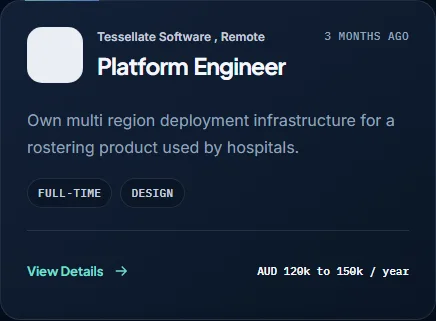
What a job card shows
| Part of the card | What it tells you | |
|---|---|---|
| Company and place | Who is hiring and where. Hybrid and remote roles say so beside the city. | |
| Role title | The job you would apply for. | |
| Age | How long ago the role was posted, for example "3 months ago". | |
| Closing note | When the employer set a closing date: Closes today, Closes tomorrow, a number of days left, or the date. | |
| Labels | The employment type and the job function, when the employer stated them. | |
| Pay | The salary range, only when the employer chose to publish it. |
Select anywhere on the card, or View Details, to open the role page.
Roles published elsewhere
Some cards carry a label with the word "via", the employer's name and "published elsewhere". These roles were gathered from the employer's own careers page, so you know they are not hosted on Risenoow.
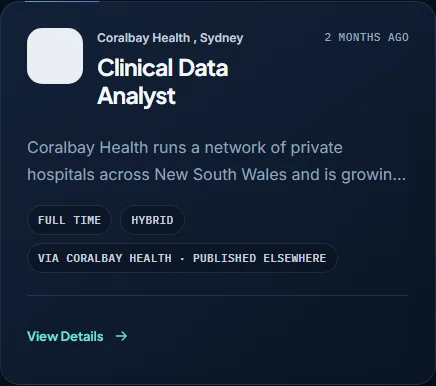
On the page for one of these roles you can select Original listing to apply on the employer's own site. Where the page also offers Apply now, you apply through Risenoow in the same way as any other role.
Read the role page
The role page shows tiles for Location, Employment, Classification and Salary, and Applications close when there is a closing date. Below them you find About the role, a short introduction to the company, and Related roles.
The panel headed Interested in this role? sums up the facts again, adding Seniority, Openings and Work rights when the employer set them, and lists What happens next: share your experience, complete the written and voice screening, then the hiring team reviews your answers.
When you are ready, select Apply now. The application opens in the same browser tab. See Start an application.
Save roles and set alerts
- On a role page, select Save role to keep it for later. If you are not signed in, the button reads Sign in to save.
- On the job board, Saved roles opens your saved list and Set a job alert creates an alert from your current keyword and location. See Saved jobs and Job alerts.
Check your CV before you apply
At the bottom of the job board, Not sure you are a fit? Check first. offers Check my CV, free. It reads your CV against a role before you apply. The score is yours alone, and nothing reaches an employer until you apply.
Frequently asked questions
Do I need an account to search or apply on Risenoow?
No. Anyone can search the job board and apply for a role. You need a free candidate account only to save roles and set job alerts.
Why does a role show no salary?
The employer decides whether to publish pay. When they keep it private, the card and the role page show no figure.
What does "published elsewhere" mean on a job card?
The role comes from the employer's own careers page rather than being posted on Risenoow. Its page links to the Original listing on the employer's site.
What happens when a role has closed?
A closed role leaves the job board. If you open an old role page, it says This role is no longer available and offers Browse open roles. An application link for a role past its closing date says This role has closed and links to the roles that are still open.