Applications over time chart
The Applications, last 30 days chart on the Risenoow dashboard shows how many applications arrived each day for the last 30 days, with a line for the average match score of each day's applicants. It shows when people apply and whether busy days bring better or weaker candidates.
Where: Dashboard, below the All candidates table, on the left
Who can use it: Workspace admins and recruiters
Time needed: Under a minute
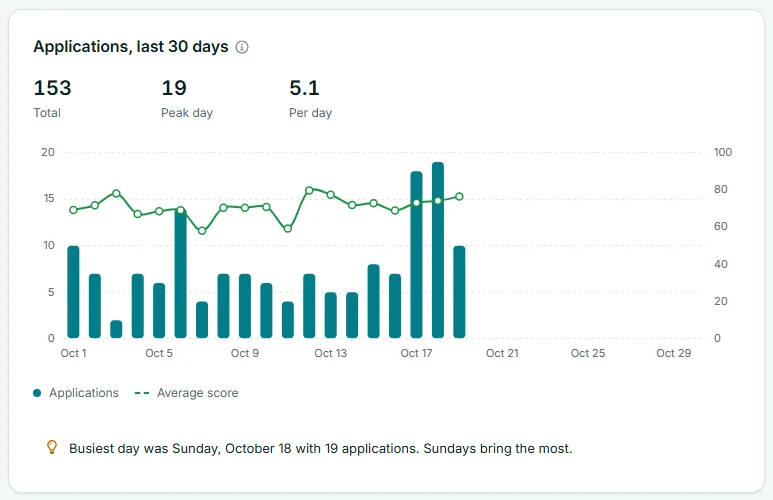
The three figures
Above the chart are three figures for the 30 days:
| Figure | What it is |
|---|---|
| Total | Every application that arrived in the last 30 days. |
| Peak day | The most applications on any single day. |
| Per day | The total divided by 30, with one decimal place. |
Reading the chart
- Across the bottom: the last 30 days, today on the right. Up to eight dates are labelled, for example "Oct 1", "Oct 5".
- Teal bars: applications per day, read against the left axis. A day counts in your workspace's own time zone, so an application at 11pm lands on the right day for you.
- Green line: the average match score of the applications that arrived that day, read against the right axis, which runs from 0 to 100. A day with no scored applications has no point on the line.
The legend under the chart names the two series: Applications and Average score.
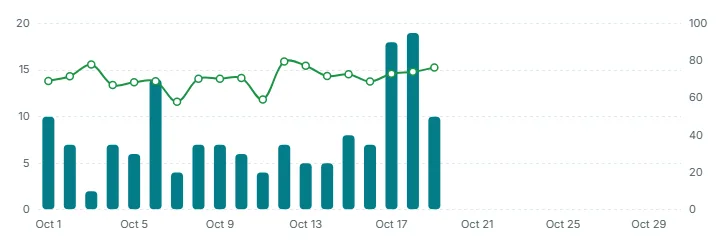
Hover
Point at any day to see a box with the full date, for example "Sunday, October 18", and both values for that day: the number of applications and the average score. A day without a score shows only the applications.
The insight line
The line at the bottom of the card names your busiest day and the weekday that brings the most applications, for example: "Busiest day was Sunday, October 18 with 19 applications. Sundays bring the most." If two days tie for busiest, the earlier one is named.
When nothing has arrived in the 30 days, it reads: "No applications in the last 30 days. Share the role's application link to start."
When you pick one role
Choose a role in Role scope and the bars, the line, the three figures and the insight line all redraw for that role. The left axis rescales to fit.
What to look for
- Spikes. A tall bar usually follows the day you shared a role. If the line dips on the same day, that audience may be a weaker fit.
- Quiet stretches. Several empty days in a row on an open role means it has dropped out of view. Share the link again, see Share a role.
- The best weekday. Post new roles or reshare them the day before the weekday the insight line names.
Good to know
The same 30 days, day by day, are in the file you get from Export. See Role scope and export.
Frequently asked questions
Why does the line have gaps?
A gap is a day when no scored application arrived. There is nothing to average, so no point is drawn.
Is the average score line the same as the Avg candidate score card?
They use the same score. The card averages every scored candidate ever. The line averages each day's applicants separately.
Why are the most recent days empty?
No applications arrived on those days in the scope you are looking at.
Can I see more than 30 days?
Not on the dashboard. The chart always covers the last 30 days.