Average candidate score card
The Avg candidate score card on the Risenoow dashboard shows the average match score of everyone the AI has scored, out of 100, and whether recent applicants are scoring higher or lower than before. It is your quickest read on the quality of the people your roles attract.
Where: Dashboard, sixth card in the row of six numbers
Who can use it: Workspace admins and recruiters
Time needed: A glance
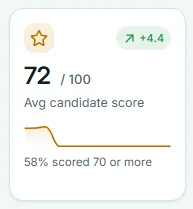
What the number averages
The big number is the average match score, rounded to a whole number, of every scored application to the roles you can see. It includes candidates at every stage, declined ones too. Applications without a score are left out, so a report produced without a score does not pull the average down.
A recruiter's card averages only the roles they created. To learn what the match score measures, see Scores explained.
The pill: recent against earlier
The pill shows the change in points, with one decimal place, for example +4.4. It compares two parts of the last 30 days:
- Recent: the last 14 days.
- Earlier: the 16 days before that.
For each part, Risenoow takes the average score of each day's applications, then averages those days. Every day with a scored application counts equally, however many people applied that day. Days with no scored applications are skipped.
A green pill with an arrow pointing up means recent applicants score the same or higher. A red pill with an arrow pointing down means lower. If either part has no scored applications, the pill shows +0.
The trend line
The line covers the last 14 days and shows the average score of each day's applications. Point at it to see the date and the average, for example "Oct 14: 74 average".
Why the line has gaps
A day with no scored applications has no point, so the line leaves a gap there instead of dropping to zero. A gap means a quiet day, not a run of weak candidates.
The footer line
The footer reads 58% scored 70 or more: the share of scored candidates with a match score of 70 or above. It reads No scores yet when no one has been scored. This is the same figure as Scored 70 or more on the Match scores chart.
When you pick one role
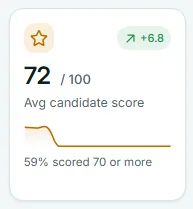
Choose a role in Role scope and the number, the pill, the line and the footer show that role only. The pill's colour and arrow change with it, so a green pill means that role's recent applicants score the same or higher.
What to do about it
- The pill turns red. Pick each role in Role scope to find the one pulling the average down. Then look at where that role is shared and whether its job description still says what you need.
- The average is high but few are shortlisted. Your strongest candidates are waiting. Go to Top candidates to decide on.
- The footer is low. Most candidates sit below 70. The Match scores chart shows how many sit at 50 to 69, where your own review makes the most difference.
Frequently asked questions
Is this the same score as on the candidate's record?
Yes. It is the match score out of 100 that appears on each candidate's report and in the Match score column of the All candidates table.
Why did the average change when nobody new applied?
It should not change unless a score changes. A report that is run again, or a candidate who is deleted, changes the average.
Why does a single strong day move the pill so much?
Each day counts equally in the pill. One day with a few high scores weighs the same as a busy day.
Does a declined candidate's score still count?
Yes. The average covers every scored application, whatever its stage.