Requirements tab
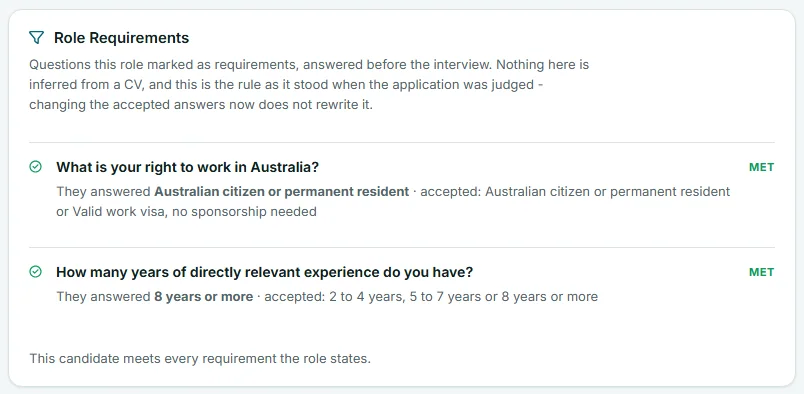
The Requirements tab on a Risenoow candidate record lists every question this role marked as a requirement, what the candidate answered, which answers you accept, and whether the requirement was met. Use it to see at a glance why an application was flagged or declined automatically.
Where: Candidates in the left menu, open a candidate, then the Requirements tab
Who can use it: Admins, and recruiters on the roles they can see
Time needed: Under a minute
What a requirement is
A requirement is a choice question on the role where you ticked the answers that meet your bar, such as a right to work or a minimum number of years. You set them on the role's screening questions. See Requirement questions.
For each requirement you also choose what happens to anyone who gives another answer:
| Setting | What happens |
|---|---|
| Flag for review | The application stays in your list, marked as not meeting the requirement. The candidate carries on as normal. |
| Auto decline | The candidate still finishes applying and is told nothing at the question. Then the application is declined and they are emailed the reason. |
Questions with a requirement are asked first, so an application you will decline never costs an interview or an AI report.
What each row shows
The card is headed Role Requirements. Each row has:
- the question, in bold
- They answered and the candidate's answer
- accepted: and the answers you ticked
- the outcome on the right
| Outcome | Meaning |
|---|---|
| Met | The answer is one you accept. |
| Not met | The answer is not one you accept, and the requirement is set to Flag for review. |
| Not met, with the word declined | The answer is not one you accept, and the requirement is set to Auto decline. Shown in red. |
| Never asked | The requirement was added to the role after this application was submitted. |
When everything is met, the card ends with This candidate meets every requirement the role states.
Frozen at the time of judging
The tab shows the rule as it stood when the application was judged. If you change the accepted answers on the role later, this record does not change. Nothing here is guessed from a CV: it comes only from the answers the candidate gave.
Where a missed requirement shows up
You do not have to open the tab to know about a missed requirement:
- The tab name carries a red count of unmet requirements.
- A tag beside the candidate's name says, for example, 1 requirement not met, with declined automatically added when the application was declined.
- The Requirements score tile shows, for example, 1 of 2 met.
- The Progress card lists Requirements with the same count. See Progress timeline.
Applications declined automatically
When an Auto decline requirement is not met, the tab opens with a red Declined automatically. notice. It explains that the application did not meet a requirement you set to decline, so it was marked Declined, that the candidate was emailed the reason, and that no interview was run and no AI report was produced.
The candidate's stage is Declined. Their Interview tab says no interview was held and points you here.
How to put a declined application back
An automatic decline is a stage like any other, so you can reverse it.
- On the Requirements tab, select the Stage and notes link in the notice. The page moves to the Stage and notes card.
- Choose another stage in Stage, such as In review.
- Select Save changes.
Moving a candidate to In review or Shortlisted emails them about the change. See Stage and notes. Because no interview was run, the record has no transcript or AI report.
Frequently asked questions
Does the candidate know they missed a requirement?
Not while they apply. Nothing is shown at the question, so the form cannot teach anyone which answer to change. With Auto decline, they are emailed the reason after they apply.
Why does the Requirements tab not appear on some candidates?
The tab only appears when the role had requirement questions when the candidate applied.
I changed the accepted answers. Why do old candidates still show Not met?
Each record keeps the rule it was judged by. Changing the role now does not rewrite past decisions about real people.
Can a flagged candidate still be shortlisted?
Yes. Flag for review only marks the application. You decide the stage.