Languages
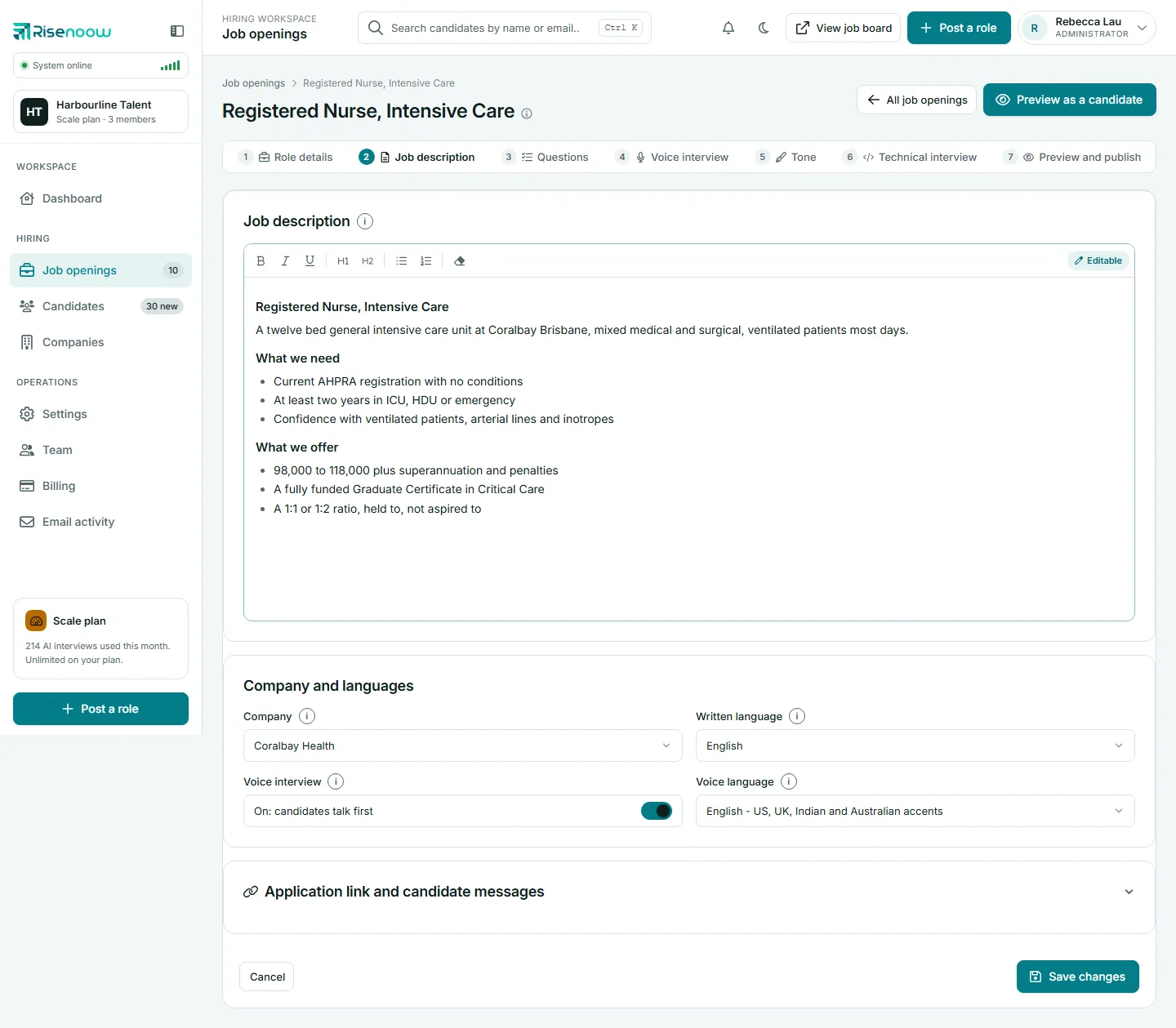
Each Risenoow role has two language settings. The Written language sets the job description and the written questions, and can be any of 23 languages. The Voice language sets the AI voice interview, and can be any of 7. You choose them separately, so an advert can read in one language while the interview happens in the language candidates speak best.
Where: Post a role, step 2, and a role's Job description tab, under Company and languages
Who can use it: Admins and recruiters who edit the role
Time needed: Under a minute
Written languages (23)
The job description and the written questions candidates answer can be in:
| English | Spanish | French | German |
| Italian | Portuguese | Dutch | Hindi |
| Urdu | Arabic | Bengali | Tamil |
| Indonesian | Malay | Filipino | Vietnamese |
| Thai | Chinese (Simplified) | Japanese | Korean |
| Turkish | Polish | Russian |
The written list is longer than the spoken one on purpose. Nothing in it has to be spoken aloud.
Voice languages (7)
The AI interviewer can hold the conversation in:
| Language | Notes |
|---|---|
| English | Covers US, UK, Indian and Australian accents. |
| Spanish | Spoken by a voice matched to Spanish. |
| French | Spoken by a voice matched to French. |
| German | Spoken by a voice matched to German. |
| Italian | Spoken by a voice matched to Italian. |
| Portuguese | Spoken in Portuguese by your workspace's chosen voice, so the accent may not be native. |
| Hindi | Spoken in Hindi by your workspace's chosen voice, so the accent may not be native. |
For English interviews, the voice and accent candidates hear is the one your workspace picks under Voice interviewer in Settings. Each voice in that list shows its language and region, and a few words on how it sounds.
How the two settings work together
- Separate choices. An English advert with a Spanish interview, or a French advert with an English interview, are both fine.
- When no voice language was chosen, the interview follows the written language. If that is not one of the 7 spoken languages, the interview runs in English. A wrong accent is recoverable; an interviewer that cannot speak the language is not.
- Voice interview off. When the Voice interview switch reads Off: written questions only, the Voice language box is greyed out but keeps your choice for when you turn it back on.
- Questions follow their own language. When the AI writes the voice questions, it writes them in the voice language, even if the description is in another language.
The language of the report
The written report your team reads is written in the role's written language, headings included. The overall score is always written the same way, as a number out of 100 such as 72/100, so it can be shown beside the candidate in every language.
What candidates hear first
Before the voice interview starts, candidates play a short sound check. The sample line is spoken in the role's interview language, so the first thing they hear already matches the conversation ahead.
Change the languages on a role
- Open Job openings in the left menu and choose the role.
- Open the Job description tab.
- Under Company and languages, choose a Written language and a Voice language.
- Select Save changes.
Frequently asked questions
How many languages does the Risenoow voice interview support?
Seven: English, Spanish, French, German, Italian, Portuguese and Hindi. English covers US, UK, Indian and Australian accents.
Can the job ad and the interview be in different languages?
Yes. Written language and Voice language are separate settings on every role.
Which language is the candidate report written in?
The role's written language. The overall score is always shown as a number out of 100.
What happens if I pick a written language the interviewer cannot speak?
Choose a Voice language from the 7 spoken ones. If none was ever chosen, the interview falls back to English.