CV manager
The CV manager in the Risenoow candidate portal keeps every CV you have uploaded or applied with in one place. Upload once and reuse it when you apply, choose which CV is your default, and open any CV in a designed template to print or download.
Where: CV manager in the left menu, or My CVs in the top bar
Who can use it: Every job seeker account
Time needed: Under a minute to upload
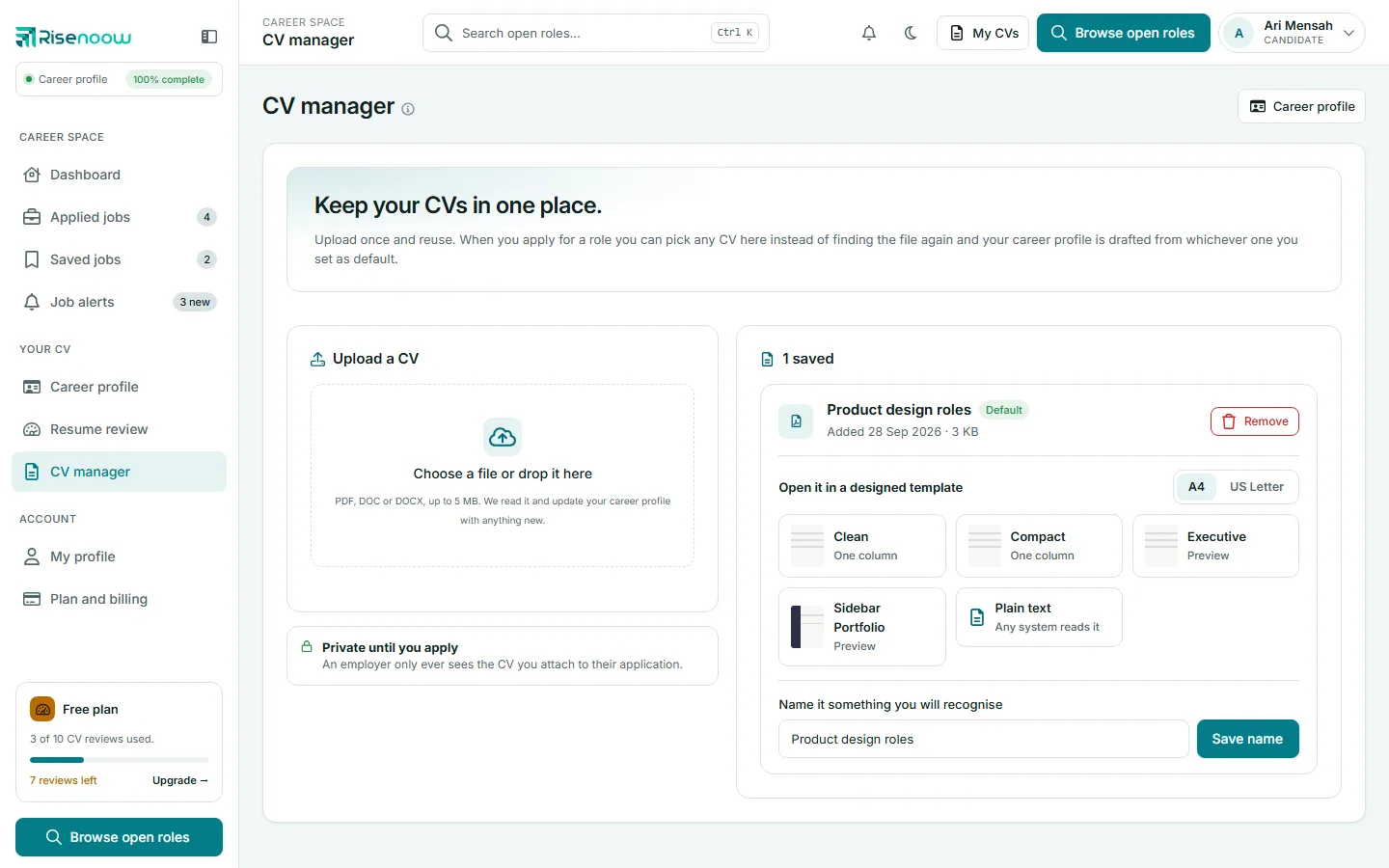
Upload a CV
- Open CV manager in the left menu.
- Under Upload a CV, select Choose a file or drop it here, or drag the file onto the box.
- Wait for the upload. The page reloads and the CV appears in your list.
| Rule | Limit |
|---|---|
| File types | PDF, DOC or DOCX |
| Size | Up to 5 MB |
After an upload, Risenoow reads the CV and updates your career profile with anything new. Anything you already edited on your profile is kept.
CVs you attach to applications are added to this list automatically, so you do not need to upload them again.
Use a CV with selectable text
A PDF where you can select the words, or a Word file, reads every time. A scanned image of a CV may not be readable.
Your default CV
One CV is marked Default. It is the one used to:
- draft your career profile,
- score against jobs on Resume review, when you choose My uploaded CV.
When you apply for a role, you can pick any CV in this list.
Your first CV becomes the default automatically. To change it, select Make default on another CV. If you remove your default CV, your newest remaining CV becomes the default.
Name a CV
Each CV shows its file name, the date it was Added and its size. To give it a name you will recognise, type in Name it something you will recognise (for example "Design roles, 2026") and select Save name.
Open a CV in a designed template
Under Open it in a designed template, every CV has a row of template tiles. No job and no rewrite is needed.
- Choose the page size at the right: A4 or US Letter. A4 is standard everywhere except North America.
- Select a template tile. It opens your CV in that template in a new tab.
- To keep it as a file, select PDF or Word under the tile. These links show on templates your plan includes.
The Plain text tile downloads a text file that any system reads.
The templates in the screenshots:
| Template | Layout |
|---|---|
| Clean | One column, generous spacing. The safest choice for an applicant tracking system |
| Compact | One column, the same content in less space, for a long career that should still fit two pages |
| Executive | One column, a ruled header and a stated summary, for senior roles |
| Sidebar Portfolio | Two columns with a coloured sidebar for the photo, contact details and skills |
A tile that says Preview is a subscription template. It opens with a PREVIEW watermark until you are on a paid plan.
Download formats
The template tiles here, on Career profile and on a rewritten CV in Resume review offer the same downloads:
| Link | What you get |
|---|---|
| Preview | The CV on screen in that template |
| A PDF file, or your browser's print window, where you choose to save as PDF | |
| Word | A Word document you can edit, with the page size in its name |
| Plain text | A text file. Always free, on every plan |
PDF and Word show only for templates your plan includes. Plain text is the version every applicant tracking system reads without error, so a designed template never leaves you stuck.
Your name, email and the contact details from your career profile fill any gaps in the CV. If your profile has a photo, templates with a photo use it.
Remove a CV
- Select Remove on the CV.
- Confirm Remove.
The CV stops being offered when you apply. Applications you already sent keep the CV you attached to them: an employer is entitled to the document they actually received.
Private until you apply
An employer only ever sees the CV you attach to their application.
Frequently asked questions
Why does a CV say File no longer available?
The file behind that entry can no longer be found. Upload the CV again and remove the old entry.
Can I upload a CV as an image?
No. Upload a PDF, DOC or DOCX file, up to 5 MB.
Why does my download say PREVIEW across it?
That template needs a paid plan. The free templates download in full, and plain text is always free. See Plan and billing.
Which page size should I choose?
A4 everywhere except the United States and Canada, which use US Letter. The wrong size either loses a margin or gains a band of white when printed.