Overview tab
The Overview tab is the first thing you see when you open a candidate in Risenoow. It brings the written report and the voice interview reading together into one assessment, with the shape first and the evidence underneath, so you can decide whether to read further.
Where: Candidate record, the Overview tab (open by default)
Who can use it: Admins, and recruiters for the roles they created
Time needed: Two to five minutes
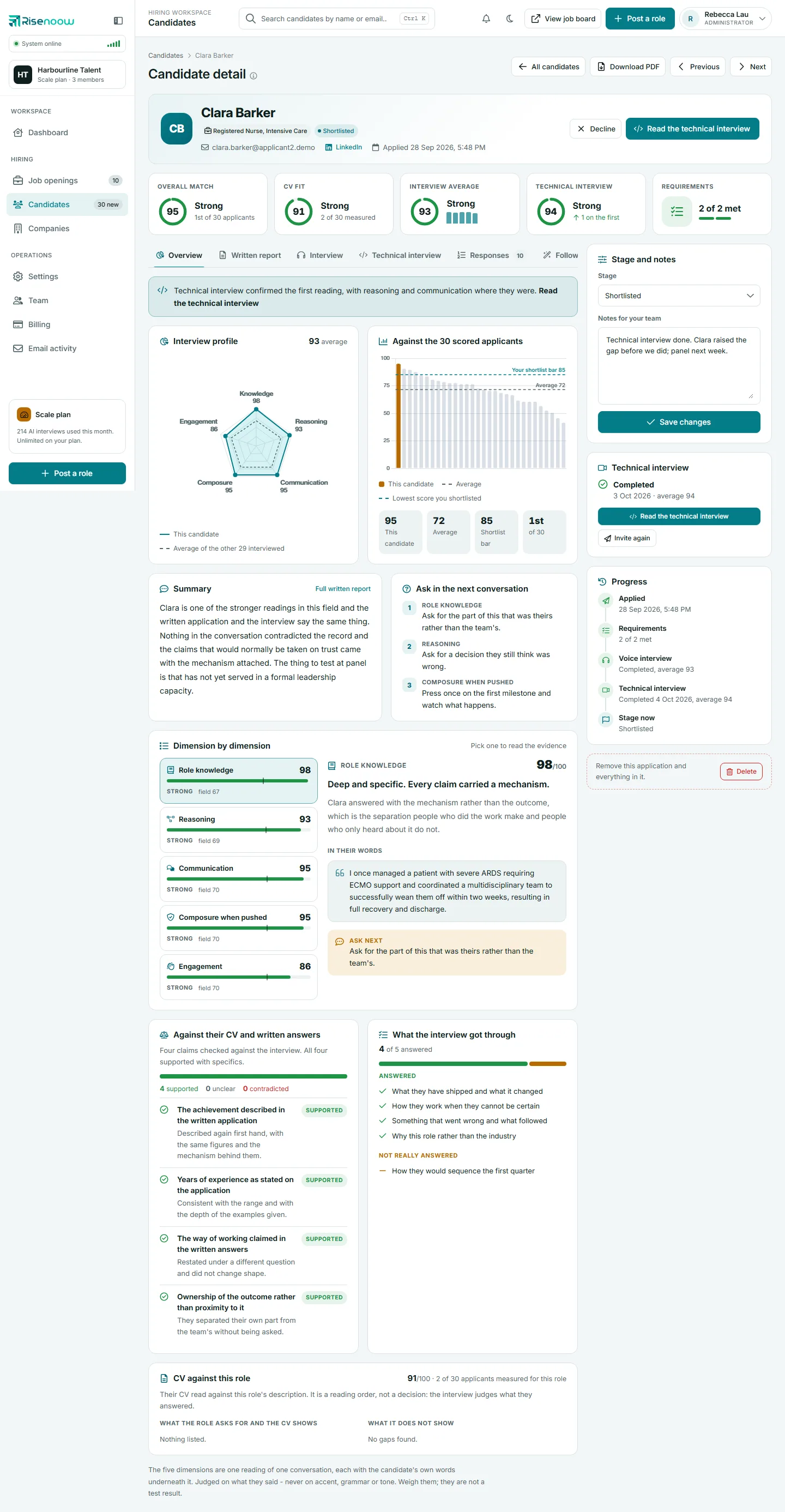
What is on the tab, in order
Cards appear from top to bottom in this order. A card is left out when there is nothing to put in it.
| Card | What it tells you | Guide |
|---|---|---|
| Technical interview note | One sentence on what the technical interview did to the first reading, with a Read the technical interview link | Technical interview tab |
| Interview profile | The five interview dimensions as a shape, against the others interviewed | Interview profile radar |
| Against the 30 scored applicants | This match score among everyone scored for the role | Against the scored applicants |
| Summary | Three or four sentences on the interview, with a Full written report link | Summary and next conversation |
| Ask in the next conversation | One question to ask next for each dimension that left one | Summary and next conversation |
| Dimension by dimension | Each dimension's score, verdict, quotes and question | Dimension by dimension |
| Against their CV and written answers | Claims checked against the interview | Claims and CV checks |
| What the interview got through | Which interview questions were answered | Claims and CV checks |
| CV against this role | What the CV shows and does not show against the job description | Claims and CV checks |
The comparison card's title carries the real count for the role, so it reads "Against the 31 scored applicants" on another record.
At the very bottom, a short note reminds every reader that the five dimensions are one reading of one conversation, each with the candidate's own words underneath it, judged on what they said and never on accent, grammar or tone. Weigh them: they are not a test result.
When there is no interview reading
Some candidates have no voice interview reading. They skipped the interview, it was too short to score, or it has not been read yet. The tab then changes:
- The Interview profile card still shows the empty five sided shape, with a line saying why: "No voice interview yet, so there are no scores to plot.", "The interview has not been read yet, so there are no scores to plot." or "The interview was too short to score: under 60 words came from the candidate."
- In place of Summary, the full written report appears in a Written report card.
- Dimension by dimension, the claim checks and What the interview got through are not shown, because they all come from the interview.
The comparison chart and the CV card still appear, since they do not depend on the interview.
When the written report is missing
If the written report never arrived, for example because the AI service did not answer when the candidate applied, a card at the top of the tab says either "No assessment is available for this candidate yet." or "The written report for this candidate is missing."
- Select Run the analysis again on that card.
- Wait while the AI reads everything the candidate supplied. Keep the page open until it reloads.
- The page reloads. You see "Analysis refreshed." when it worked, or a message saying nothing was changed and what to try next.
Info
The button only appears when the report is missing. A report that already exists is never run again, so the reading your team acted on does not change under you.
Moving to other tabs from here
- Full written report on the Summary card opens the Written report tab.
- Read the technical interview in the note at the top opens the Technical interview tab.
- Selecting a quote in Dimension by dimension opens the Interview tab at the line it came from.
Frequently asked questions
Why are the charts empty or missing on a new application?
The reading may still be in progress, or nobody else has been scored for the role yet. The comparison chart fills in once at least two applicants are scored.
Does the Overview tab show the written answers?
No. The candidate's own answers are on the Responses tab, and their answers to follow up questions are on the follow ups tab. The Overview tab shows the reading of them.
Can I change the scores on this tab?
No. Scores are readings of what the candidate supplied, kept as they were made. Record your own view in Notes for your team and set the stage.
Does running the analysis again repeat the voice interview?
No. It reads the same written answers, interview transcript, follow up answers and CV again to write the missing report. The candidate is not contacted.