The voice interview
Many Risenoow roles include a short spoken interview with an AI interviewer. It asks the employer's questions out loud, one at a time, listens to your answers in your own words and never interrupts. This page explains how to get ready, what the interviewer does, and how the interview ends.
Where: The Short interview stage, after the requirement questions and before the written questions
Who sees it: Applicants for roles with a voice interview. Some roles make it Required, others Optional.
Time needed: A few minutes for the sound check, then a short conversation
Get ready
When the interview is next, you see Your voice interview is next. with three steps: Check your sound, Listen, then answer and Written questions.
Before you start
Find a quiet place, turn your volume up and allow your microphone when your browser asks. Headphones with a microphone help in a noisy room.
- Select I'm ready, start.
- On Can you hear us?, select Play the sample. Your browser asks for the microphone first. Allow it.
- Listen to a short line in your interviewer's voice. When the tone ends, say a few words, such as your name and the role you are applying for.
- When you see "We can hear you clearly, and you can hear us. You are ready to start.", select Start the interview.
- A short countdown runs while your interview connects.
If the check could not hear you, choose the right microphone from the Microphone list, watch the Input level bar move as you speak, and select Play it again. If the sample cannot play on your device, the line is shown on screen instead. Read it out loud and the check listens for you.
On optional roles, Continue without voice lets you skip the interview and go straight to the written questions.
What the interviewer does
The interview screen shows the role at the top, a timer, and a card with the current question and its number, such as "Question 1 of 4". If the employer added a picture to a question, it appears while that question is asked.
- It greets you. The interviewer says hello by your first name, introduces the company, tells you how many questions there are, and waits for you to say you are ready.
- It reads each question. One at a time, in order.
- It listens without interrupting. Take as long as you need. A long, detailed answer is welcome.
- It checks before moving on. After each answer it gives a short acknowledgement and asks whether you would like to add anything or move on. It moves on only when you say you are done.
You can ask the interviewer to repeat a question, to put it in simpler words, or to go back to an earlier question. The interviewer gives no feedback on your answers. That is the hiring team's job.
Select Show transcript at any time to read the conversation so far.
If you pause
Pauses are treated as thinking time. The interviewer never moves to the next question because you went quiet. When you pause, it gently asks whether there is more you would like to share. If you need a moment, say so, for example "let me think", and it waits.
Languages
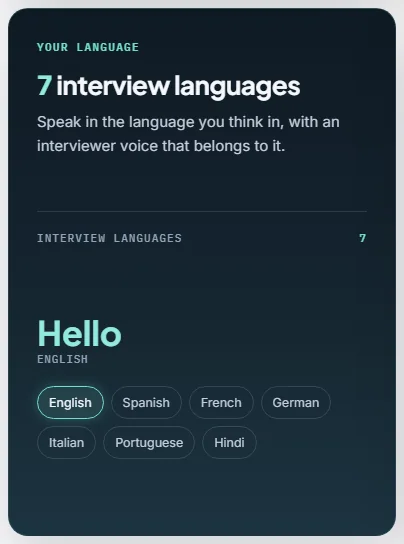
The employer chooses the interview language for each role: English (with US, UK, Indian and Australian accents), Spanish, French, German, Italian, Portuguese or Hindi. It can differ from the language the job ad is written in. The sample line in the sound check is spoken in that language, and the interviewer stays in it for the whole conversation. See Languages.
How it ends
After the last question, and after you confirm you have nothing to add, the interviewer thanks you and tells you the next step is the written application. The interview then ends by itself.
- Wait while you see Saving your interview. On a slow connection this can take a minute. Keep the page open.
- When you see "Interview complete", select Continue to written application.
- Carry on with the written questions.
On optional roles, Skip voice interview is available during the conversation. In rare cases where someone does not take part at all after several gentle attempts, the interviewer says a warm goodbye and ends the conversation.
If something goes wrong
- Your interviewer has not joined yet. The page tries again for up to a minute.
- We could not continue. Select Try again. On a required interview that fails twice, Continue without voice appears so you are never stranded.
- No sound from the interviewer. If your browser blocked sound, select Enable sound.
- Microphone problems. See Devices and troubleshooting.
Frequently asked questions
Is the Risenoow voice interview with a real person?
No. It is an AI interviewer that asks the employer's questions. Real people at the hiring team read the transcript and make the decisions.
Is the voice interview recorded?
Yes. You agree to your responses, including any voice recording, being processed when you start your application. The hiring team receives the conversation as part of your application.
Can I practise before I apply?
Yes. Try an interview at the top of Risenoow's public pages opens a sample interview you can take without applying for anything.
Can I choose the interview language?
No. The employer sets the interview language for each role. The role's sound check and interview both use it.
What if I give a bad answer?
Ask to go back to that question and answer it again. The interviewer returns to it and takes your new answer in place of the old one.