AI reviewed card
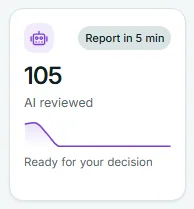
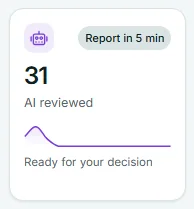
The AI reviewed card on the Risenoow dashboard counts candidates whose AI report is ready and who are waiting for your decision. It also shows how quickly reports arrive after someone applies.
Where: Dashboard, fourth card in the row of six numbers
Who can use it: Workspace admins and recruiters
Time needed: A glance
What the number counts
The big number is every candidate at the AI reviewed stage, across the roles you can see. A candidate reaches this stage when the AI has read their written answers and their voice interview and produced a scored report.
A candidate leaves this stage, and this count, as soon as you move them on: to In review, Shortlisted or Declined. So the number is the queue of finished reports that still need a person to decide. These candidates are also part of the Awaiting review card, which counts everything no person has acted on yet.
A recruiter's card counts only the roles they created.
The pill: how fast reports arrive
The pill reads Report in 5 min. It is the average time between a candidate submitting and their AI report being ready, for applications submitted in the last 30 days. Each role is averaged first, then the roles are averaged together. Under ten minutes it shows one decimal place, for example Report in 4.5 min.
If no report has been produced in the last 30 days, the pill reads No reports yet.
The trend line
The line covers the last 14 days. For each day it shows how many AI reports were finished that day, whatever stage those candidates are at now. It is a picture of how busy the AI has been for you. Point at the line to see the date and count, for example "Oct 15: 6 reviewed".
The footer line
The footer always reads Ready for your decision, a reminder that these candidates are waiting on you, not on the AI.
When you pick one role
Choose a role in Role scope and the number, line and pill show that role only. The pill then gives that role's own average report time.
What to do about it
- Start with Top candidates to decide on, which lists the highest scores at this stage and the stages around it.
- For the rest, open Candidates in the left menu and filter by the AI reviewed stage.
- Read each report and move the candidate on. In review tells the team you are looking at them. Shortlisted and Declined are decisions.
Good to know
A large and growing number here is the clearest sign of a backlog. The AI has done its part; the next step is yours.
Frequently asked questions
Is AI reviewed the same as scored?
Nearly. Most reports come with a match score. A report on an application with too little in it to judge is produced without a score, and that candidate still counts here.
Why did the number go down when nobody applied?
Someone on your team moved candidates on from AI reviewed. That is the card working as intended.
Why is the report time longer than usual?
The time runs from submission to finished report, averaged over the last 30 days, so one slow report can lift it for a while. If a report has not arrived an hour after someone applied, Needs your attention shows AI reports have not finished, with a button to open the candidate and run the analysis again.
Does the trend line count candidates I already shortlisted?
Yes. The line counts reports finished on each day, whatever has happened to those candidates since.