Delete a workspace
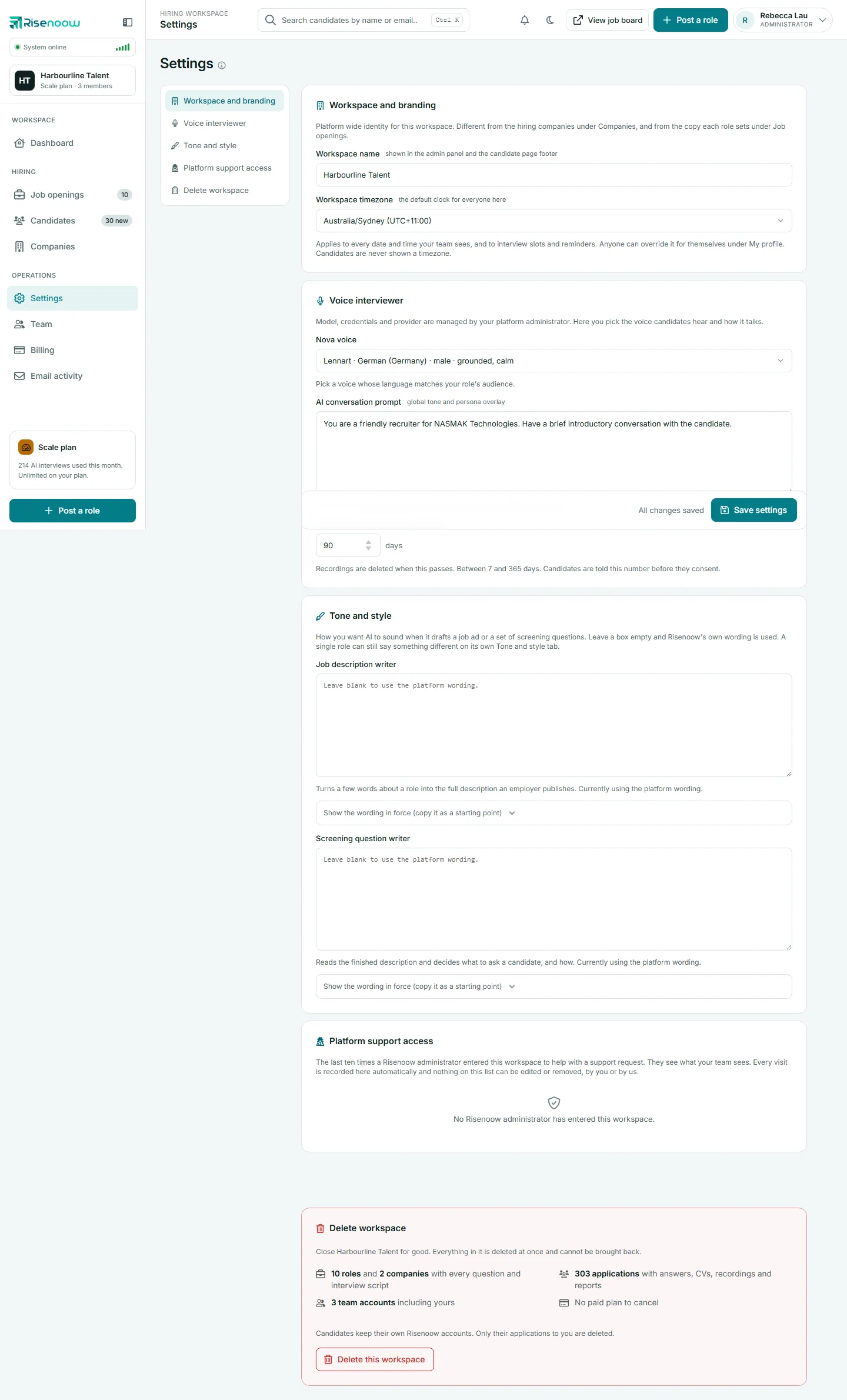
A workspace admin can close a Risenoow workspace for good from the Delete workspace card at the bottom of Settings. Everything in the workspace is deleted at once and cannot be brought back, and a live paid plan is cancelled in the same step, so you are never billed for a workspace that no longer exists.
Where: Settings in the left menu, then Delete workspace
Who can use it: Workspace admins only, signed in as themselves
Time needed: About 2 minutes
Before you delete
Deletion is permanent and immediate. Save any candidate reports you need to keep (see PDF and export), and tell your team, because their accounts are deleted too.
What is deleted
The card lists your own numbers. Everything below goes:
| What | Includes | |
|---|---|---|
| Roles and companies | Every role and company, with every question and interview script | |
| Applications | Answers, CVs, recordings and reports | |
| Team accounts | Every admin and recruiter account in the workspace, including yours | |
| Paid plan | Cancelled at once, so you are not billed again. The card says No paid plan to cancel when there is none |
Settings, invitations, usage history and the email log for the workspace are removed too.
What candidates keep
Candidates keep their own Risenoow accounts. Only their applications to you are deleted.
Delete your workspace
- Open Settings in the left menu and select Delete workspace.
- Read the list of what will be removed.
- Select Delete this workspace.
- In the box that opens, type your workspace name in the first field. The label shows the name in bold. Capital letters do not matter.
- Type your password in Your password.
- Select Delete workspace. The button stays off until the name matches and a password is entered.
Risenoow deletes the workspace, signs you out and takes you to the sign in page. A confirmation email, "Your Risenoow workspace has been deleted", goes to your address. If you did not ask for the deletion, reply to that email straight away.
Changed your mind? Select Keep my workspace to close the box without deleting anything.
The safety checks
Several checks protect a workspace from being deleted by mistake:
- Only an admin can delete it. Recruiters cannot open Settings at all.
- Your own sign in only. A Risenoow administrator on a support visit cannot delete your workspace. The card says "A workspace cannot be deleted during a support visit. Only its own admin can delete it."
- Name and password. Typing the name back and entering your password stops a stray click or an unattended laptop from doing it.
- Limited attempts. After five tries in fifteen minutes, you wait fifteen minutes before trying again.
- Plan first. If your paid plan cannot be cancelled at that moment, nothing is deleted.
If deletion is refused
| Message | What to do |
|---|---|
| The workspace name you typed does not match. Type it exactly as shown. | Check the spelling and spaces against the name in the box title. |
| That password is not right. Nothing was deleted. | Type the password you sign in with. |
| Too many attempts. Wait fifteen minutes and try again. | Wait, then try again. |
| Your paid plan could not be cancelled just now, so nothing was deleted. | Try again in a few minutes, or cancel the plan in Manage billing on the Billing page first. |
| Your paid plan could not be cancelled from here. | Cancel the plan in Manage billing on the Billing page, then delete the workspace. |
Frequently asked questions
Can a deleted workspace be restored?
No. Everything is deleted at once and cannot be brought back, which is why the card asks for your name and password first.
Do I need to cancel my plan before deleting?
No. Deleting the workspace cancels a live paid plan at once. Cancel it yourself first only if deletion reports that the plan could not be cancelled.
What happens to candidates who applied to us?
Their applications to you are deleted. Their own Risenoow accounts stay with them, along with any applications to other employers.
Can I stop paying and keep my data?
Yes. Cancel the plan in Manage billing instead. Your roles and candidates stay, and new AI interviews stop. See Change or cancel a plan.