Change or cancel a plan
You change your Risenoow plan from the Choose a plan card on the Billing page. Your first plan is bought on a secure payment page. Once you are paying, picking another plan changes your existing subscription in place. Your card, billing history and cancellation are handled in Manage billing, our payment provider's secure page.
Where: Billing in the left menu, Choose a plan card and Manage billing
Who can use it: Workspace admins only
Time needed: About 3 minutes
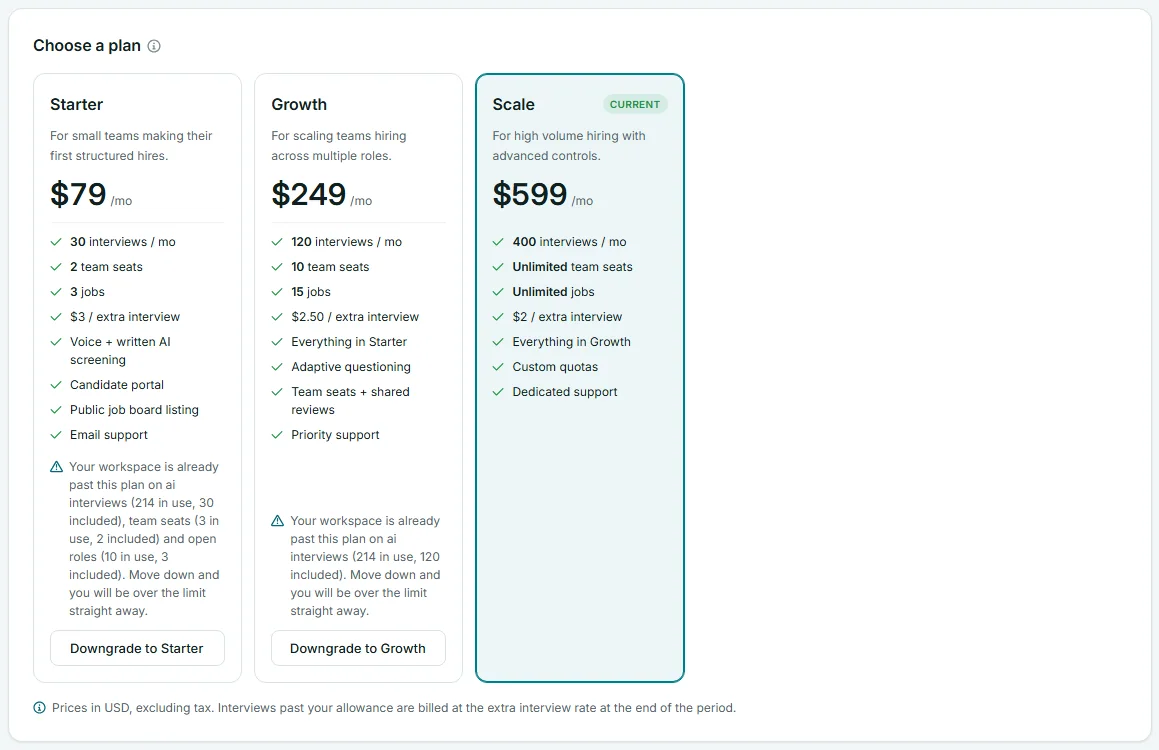
Read the plan cards
Each plan card shows the plan name, a short description, the monthly price, and what is included: interviews per month, team seats, jobs, the price of an extra interview, and the plan's features. Your plan is marked Current. For a full comparison, see the pricing page.
The button on each other plan tells you which way you are moving:
| Button | When you see it | |
|---|---|---|
| Upgrade to | The plan costs more than yours, or you have no plan yet. | |
| Downgrade to | The plan costs less than yours. | |
| Switch to | The plan costs the same as yours. |
Upgrade or switch
Your first plan
- Open Billing in the left menu.
- In Choose a plan, select Upgrade to on the plan you want.
- On the secure payment page, enter or confirm your card and complete the checkout. You can add a promotion code there if you have one.
- You return to Billing, which shows "Subscription active. Welcome aboard!"
Your new allowances apply as soon as the payment provider confirms the subscription, and a confirmation email is sent to the workspace. If you leave the payment page without paying, Billing shows "Checkout cancelled." and nothing changes.
When you already pay for a plan
Select Upgrade to or Switch to on the plan you want. There is no second checkout: your current subscription moves to the new plan, using the card on file.
- The difference for the rest of this billing period is charged at once.
- The new plan applies once that payment goes through. Billing then says "You are now on" the plan, and that the difference has been charged, or credited if the new plan costs less.
- If the payment does not go through, your plan stays as it was and Billing says "The payment for the new plan has not gone through yet, so your plan has not changed."
- If an earlier payment is still unpaid, Billing says "Your last payment has not gone through. Update your payment details under Manage billing, then change plan. Nothing was changed."
Downgrade
Moving to a smaller plan works the same way, with one extra check.
- Open Billing in the left menu.
- Read the plan card first. If your workspace already uses more than the smaller plan allows, the card warns you, for example "Your workspace is already past this plan on team seats (3 in use, 2 included). Move down and you will be over the limit straight away."
- Select Downgrade to on the plan.
- Confirm in the box that says "Your usage has to fit the smaller allowance."
- If you already pay for a plan, the change is made straight away and the difference is credited to your account. Otherwise, complete the secure checkout.
Before you downgrade
Bring your usage inside the smaller plan first. Disable members or revoke invitations on the Team page, and close roles you no longer hire for. Otherwise you are over the limit from day one: no new invitations, and no new roles going live.
Update your card
- Open Billing in the left menu.
- Select Manage billing at the top of the page.
- Change your payment method on the secure billing page.
- Return to Risenoow with the link on that page.
Manage billing appears once your workspace has subscribed. Do this straight away if your plan status shows Past due: voice interviews may pause, and you cannot change plan, until the payment goes through.
Cancel a paid plan
Cancel from Manage billing, on our payment provider's secure page. When the subscription ends, your plan status changes to Cancelled, and new AI interviews no longer start. Your roles, candidates and reports stay in the workspace.
If you want to close the workspace entirely, you do not need to cancel first. Deleting a workspace cancels a live paid plan at once, so you are not billed again. See Delete a workspace.
If the plan buttons are turned off
Sometimes a note above the plans says card payment is not switched on yet, or that a plan has no price set up. In that case the buttons cannot be used from your workspace. Contact Risenoow through the contact page and we will sort it out.
Frequently asked questions
Can I change plan in the middle of a month?
Yes. The difference for the rest of the period is charged at once, or credited when the new plan costs less. Your allowances follow the new plan once that payment goes through.
Do I lose anything when I downgrade?
No data is deleted. You have smaller allowances, so you may need to close roles or free seats to work inside them.
What happens to interviews over my allowance?
They are billed at your plan's extra interview rate at the end of the period, as the note under the plans says. See Plan usage.
Can a recruiter change the plan?
No. Only workspace admins can open Billing.