Step 2: Job description
The Job description step of Post a role in Risenoow is where the description comes from. You can let the AI write it from your role facts, or bring your own in four other ways. On the same screen you choose the company, the written language, the voice language and whether the role has a voice interview.
Where: Post a role, step 2, card Bring the job description
Who can use it: Workspace admins and recruiters
Time needed: One to five minutes
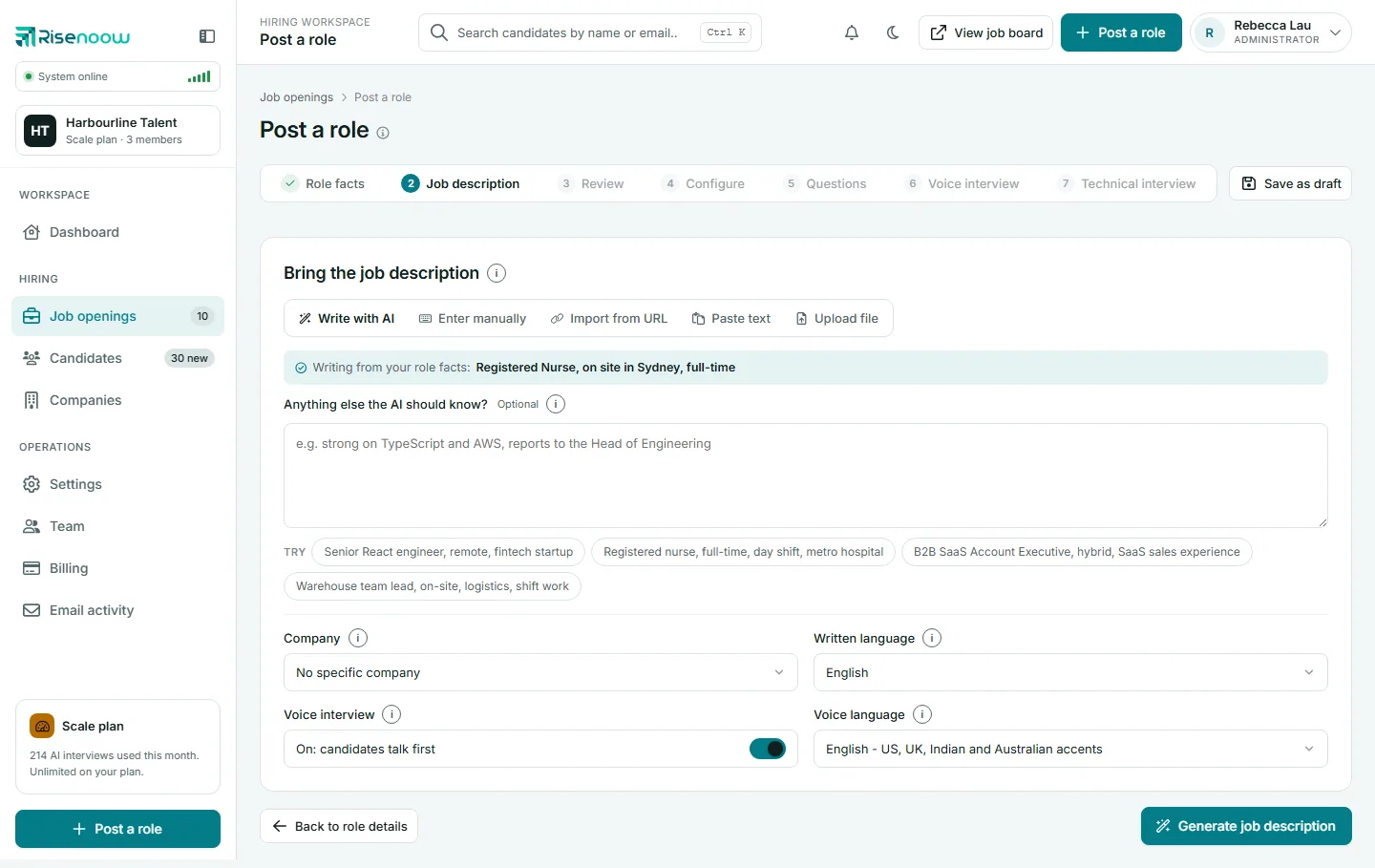
The five ways in
| Tab | Use it when | Button | Next screen |
|---|---|---|---|
| Write with AI | You want a full description written from your role facts | Generate job description | Review |
| Enter manually | You want to type it yourself | Create job opening | Configure (Review is skipped) |
| Import from URL | The job is already posted on a public site | Fetch and review | Review |
| Paste text | You have it in a document or email | Review | Review |
| Upload file | You have it as a PDF, Word or text file | Review | Review |
Select a tab to switch. The button at the bottom right changes to match it.
The four shared fields
These sit under every tab and apply to the whole role.
| Field | What it does |
|---|---|
| Company | The company you are hiring for. Its name and introduction go into the job description and the voice greeting, and its introduction is shown above the published description. No specific company leaves it out. If you have no companies yet, the field links to Companies so you can add one. |
| Written language | The language of the job description and the written questions candidates answer. 23 languages are offered, from English to Korean. |
| Voice interview | A switch. On: candidates talk first means candidates take a short spoken interview before the written questions. Off: written questions only means no voice interview. |
| Voice language | The language of the spoken interview only. It can differ from the written language. The interviewer speaks English (US or UK accent), Spanish, French, German, Italian, Portuguese or Hindi. Greyed out when the voice interview is off. |
Good to know
Writing and speaking are separate choices. You can publish the advert and written questions in English and hold the voice interview in Spanish, for example.
When the voice interview is off
- The Voice interview step disappears from the step bar.
- Step 4 does not ask how many voice questions to write.
- No voice questions are written, and candidates go straight from their details to the written questions.
- The technical interview is unaffected. It is a separate, later stage.
Write it for your company
On Import from URL, Paste text and Upload file, choosing a company adds a second button: Write it for followed by the company name. Use it when the text you brought is a sample from somewhere else. The AI writes a fresh description for the same role, for your company, keeping the role, responsibilities and requirements. It does not carry over the sample's team, benefits, pay, customers or markets.
Write with AI already writes for the chosen company, so it has no extra button.
Coming back to this step
If you go back to Role facts and then forward again, a card says Your job description is kept, with a short extract. Select Continue with this description to carry on, or bring a new one below. A new one replaces the kept one only when you continue with it.
When Send candidate reports to was filled in on step 1, a note under the fields says where reports go, with a Change link back to step 1.
Back to role details returns to step 1 without losing anything.
Frequently asked questions
Which way in gives the best questions?
All five lead to the same question writer, which reads the final description you approve. Write with AI also passes anything you typed in its box to the question writer, so requests such as "ask about rostering software" reach every stage.
Can I change the language after the role is created?
Yes, on the role's Job description tab. Questions already written stay in their language until you write a fresh set.
What does the company change?
The company's name and introduction shape the description and the voice greeting, and the introduction is shown at the top of the published description.
Why is there no Review step after Enter manually?
You wrote the text yourself, so the wizard goes straight to Configure.