Interview tab
The Interview tab on a Risenoow candidate record holds the candidate's AI voice interview: the recording, when one was kept, and the full transcript underneath it. Use it to hear or read exactly what the candidate said before you trust a score built on it.
Where: Candidates in the left menu, open a candidate, then the Interview tab
Who can use it: Admins, and recruiters on the roles they can see
Time needed: As long as the interview, usually a few minutes
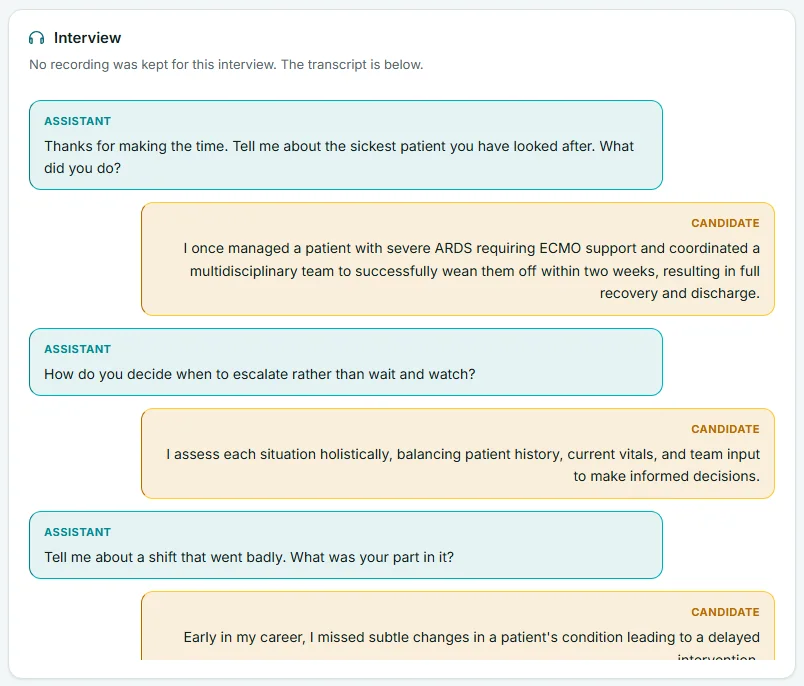
What the tab shows
The tab has up to three parts, from top to bottom.
| Part | What it is |
|---|---|
| Audio player | The whole conversation as a recording, with the line The full conversation, and the transcript underneath it. It appears only when a recording was kept. |
| Transcript | Every turn of the conversation. Lines labelled Assistant are the AI interviewer. Lines labelled Candidate are the candidate, shown on the right in a different colour. The transcript scrolls inside its own box. |
| Interview timeline (diagnostic) | A folded section with timings and word counts for each turn, and whether the microphone was live. It holds no audio and no answer content. It is there to help explain a short or broken interview. |
When no recording was kept, the tab says No recording was kept for this interview. The transcript is below. The transcript is still complete.
How to play the recording
- Open Candidates in the left menu and select a candidate's name.
- Select the Interview tab.
- Press play on the audio player at the top.
- Drag the player's progress bar to move to any point in the conversation.
- Read along in the transcript underneath.
The recording plays inside the page. Only people signed in to your workspace with access to this role can play it.
Good to know
On this tab you move through the recording with the player's own progress bar. Clicking a line in the transcript to jump to that moment works on the Technical interview tab, where the video recording keeps a time for every line. See Technical interview tab.
Jump from a quote to the transcript
The scores on the Overview tab come with the candidate's own words under them, in the In their words list of Dimension by dimension. Each quote is a button.
- On the Overview tab, pick a dimension in Dimension by dimension.
- Select a quote under In their words.
- Risenoow opens the Interview tab, scrolls to the line the quote came from and highlights it.
This is the fastest way to check a claim: you see the question that was asked and the full answer around the quoted words.
When there is no interview
If the candidate never finished the voice interview, the tab says The candidate did not complete the voice interview.
If the application was declined automatically because it did not meet a requirement, the tab explains that no interview was held and why: the voice interview was never offered, and the Requirements tab shows which requirement was not met. See Requirements tab.
If a role's voice interview is switched off, its candidates have no Interview tab at all, because there could never be a recording to show. The tab stays on any candidate who does have a transcript or recording.
The Progress card beside the record also says whether the voice interview was Completed or Not completed. See Progress timeline.
How the interview is judged
The AI reads only what the candidate said. It is never judged on accent, grammar or tone. The interviewer's questions are not evidence about the candidate. If the interview was too short to score, because fewer than 60 words came from the candidate, the Interview profile on the Overview tab says so instead of plotting scores.
Frequently asked questions
Why is there a transcript but no recording?
Not every interview keeps a recording. When none was kept the tab says so, and the transcript is still the complete record of what was said.
Can I download the voice interview recording?
The record has no download button for it. The recording plays inside the candidate record for signed in members of your workspace who can see this role.
Why can I not click a transcript line to jump to it?
Line by line jumping is available for the technical interview video, where each line carries a time. On the voice interview you move with the audio player's progress bar, or jump from a quote on the Overview tab.
Does the transcript include the follow up questions?
No. The written follow up questions and their answers are on the Follow-ups tab. See Follow ups tab.
Can the candidate change what they said?
No. The transcript is stored as the interview happened, and the reading of it is never run again when you open the record.