Plan and billing for job seekers
Plan and billing in the Risenoow candidate portal shows the plan you are on, how much of it you have used, and the other plans you can move to. Every job seeker starts on the free plan, and most never need more.
Where: Plan and billing in the left menu, or Upgrade in the plan card below the menu
Who can use it: Every job seeker account
Time needed: A minute to read, a few minutes to change plan
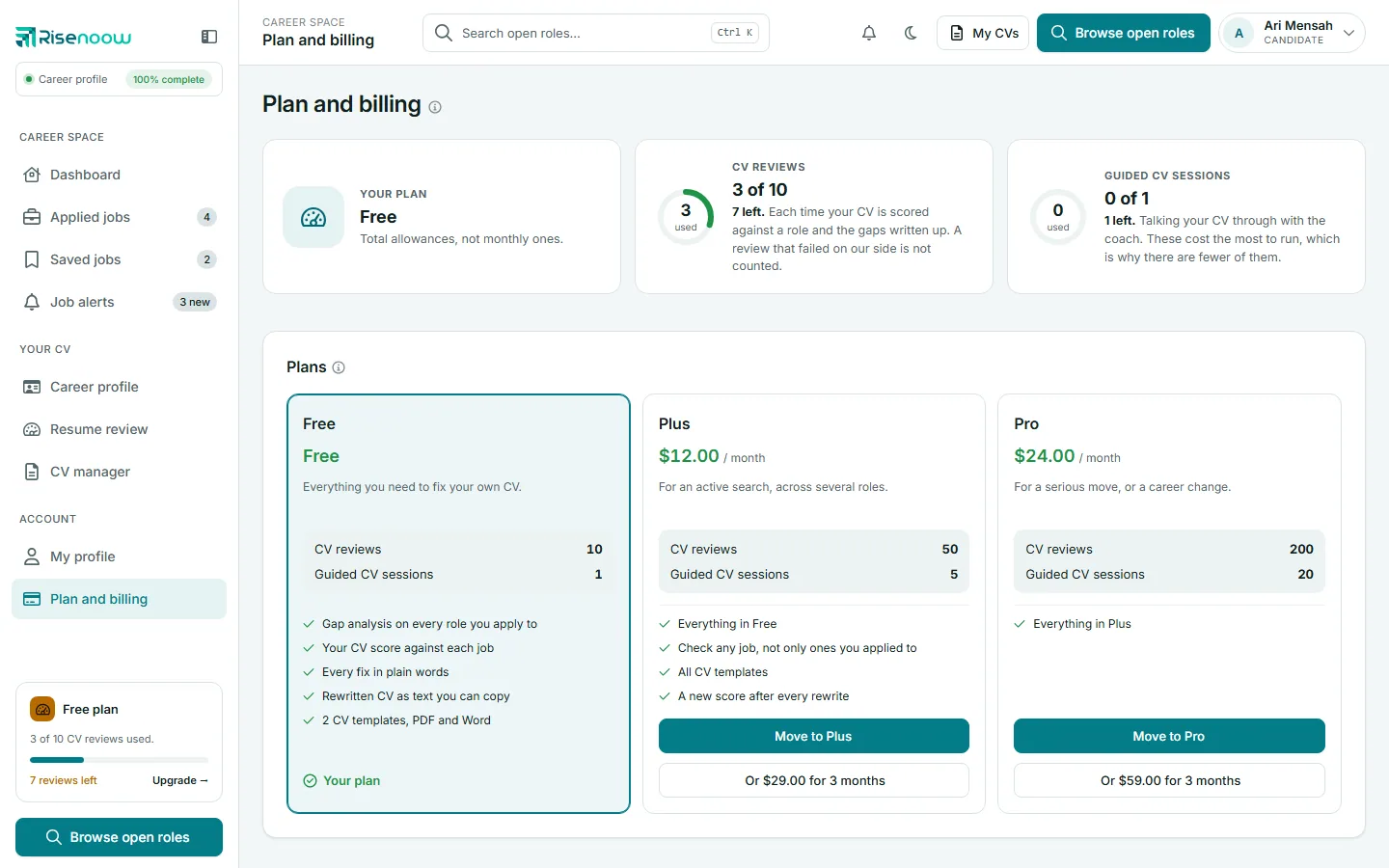
For current prices, see pricing for job seekers.
What you have used
Three cards sit across the top:
| Card | What it shows |
|---|---|
| Your plan | The plan name |
| CV reviews | How many you have used of your allowance, and how many are left |
| Guided CV sessions | How many sessions talking your CV through with the coach you have used, and how many are left |
A CV review is counted each time your CV is scored against a role and the gaps written up. That includes the review Risenoow runs when you apply for a role with a CV attached. A review that failed on our side is not counted. See Resume review.
When an allowance runs out, the card says All used. If your plan does not include something, it says so. Everything already on your account stays where it is, and you can still rewrite your CV from reviews you already have.
Totals or monthly
On the free plan, your allowances are totals for the life of your account, not monthly ones. On a paid plan, use is counted from the start of each month of your subscription.
The same numbers show in the plan card below the left menu ("3 of 10 CV reviews used") and on the Your plan card on your dashboard.
The plans
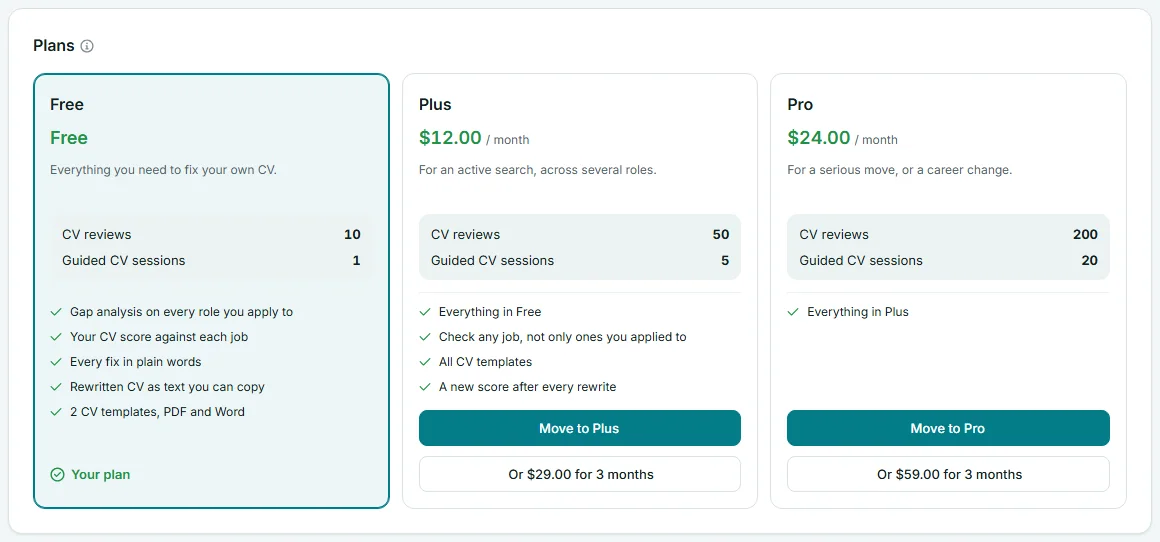
Each plan card shows its name, its price, a one line description, its CV reviews and Guided CV sessions allowances, and a list of what it includes. Your current plan is marked Your plan.
Paid plans add more CV reviews and guided sessions, and unlock every resume template, including PDF and Word downloads of the templates marked Subscription. The free templates and plain text are always free.
Move to a paid plan
- Open Plan and billing in the left menu.
- On the plan you want, select Move to and the plan name. Some plans also offer a three month option underneath.
- Confirm Continue to payment.
- Pay on the secure page from our payment provider.
When you come back, the message "You are on your new plan. Nothing else to do." confirms it. If you leave the payment page without paying, nothing changes and nothing is charged.
Payments, invoices and cancelling
Once you have paid for a plan, a Payments and invoices button appears at the top right. It opens the billing page of our payment provider, where you can see invoices, update your card or cancel.
The page promises: "Change or cancel whenever you like. Nothing you have already done is lost." Your reviews, CVs and career profile stay on your account when you move back to the free plan.
Deleting your account
Deleting your account cancels a paid plan at once, so you are not billed again. See Delete your account.
Frequently asked questions
Do I need a paid plan to apply for jobs?
No. Applying, the portal, saved jobs, job alerts and your career profile are all on the free plan.
Does my allowance reset each month?
On the free plan, no: the allowances are totals. On a paid plan, use is counted from the start of each month of your subscription.
What happens when I run out of CV reviews?
You cannot start a new review until you move up a plan. Every review you already have stays on your account, and you can still rewrite your CV from it.
Where are the prices?
On the plan cards in the portal, and at pricing for job seekers.