Technical interview invitation
When a hiring team wants to know more after your application, they may invite you to a second stage technical interview on Risenoow. It is a spoken conversation with an AI interviewer about the work itself, held at a time that suits you. The invitation arrives by email, and its link opens a page that explains what happens, in order.
Where: The invitation email, then the invitation page its link opens
Who receives it: Applicants the hiring team invites
Time needed: The page shows the length, for example about 25 minutes
The invitation email
The subject reads "Your technical interview for" the role. The email says which company is inviting you, roughly how long the interview takes, whether your camera is needed, and either the date to complete it by or that you can pick a time.
Select Open your interview or Pick your time. If the button does not work, the email also shows the link to copy into your browser.
Keep the email
Your interview link lives only in this email. Signing in to your portal shows the invitation, but you start the interview from the email link.
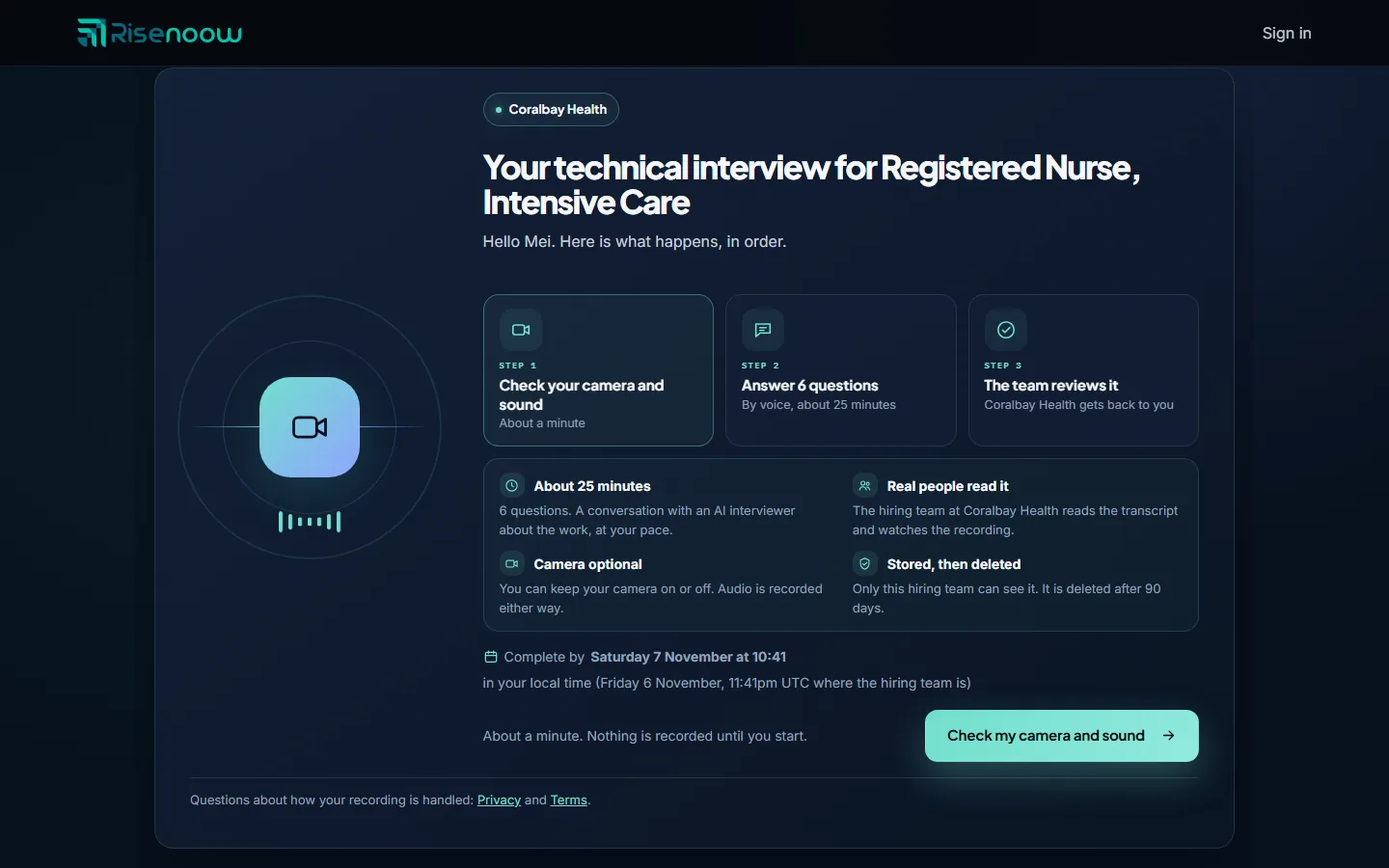
What the invitation page shows
| Part | What it tells you | |
|---|---|---|
| Step 1 | Check your camera and sound, about a minute. On a time based invitation the first step is Pick a time. | |
| Step 2 | How many questions you will answer, by voice, and the length. | |
| Step 3 | The team reviews it: the company gets back to you. | |
| About ... minutes | The number of questions and that it is a conversation with an AI interviewer about the work, at your pace. | |
| Real people read it | The hiring team reads the transcript and, when there is video, watches the recording. | |
| Camera optional, Camera on or No camera | Whether your camera is optional, required for the whole interview, or not used at all. | |
| Stored, then deleted | Only this hiring team can see it, and it is deleted after the number of days shown. |
Two kinds of invitation
Complete by a date
The page shows Complete by and a date and time in your local time. If that falls on a different day where the hiring team is, their date is shown too. You can start any time before then, and you may get a reminder email if you have not taken it yet. When ready, select Check my camera and sound and follow Camera and sound check.
Pick a time
- Check the zone under Times are shown in. It follows your device, and you can pick another one.
- Select a time. Times are on weekdays and at least two hours from now.
- The page shows Booked for and your time. You also receive an email headed "Your technical interview is booked".
- Select Add to calendar or Google Calendar to save it.
- Come back from the email link on the day. The interview opens ten minutes before your time.
You are reminded by email a day before and an hour before. The link to pick a time works until the last time the employer offered has passed.
Move your time once
While your booked time is more than two hours away, Change time lets you pick a new one. The old time goes back on offer. You can move an interview once. After that, the page says this time is the one. If something comes up later, reply to the employer.
If you miss your booked time and have not moved it before, the page says "You missed your time. Pick one new time below."
When the link stops working
| Page heading | What to do | |
|---|---|---|
| This link has expired | The date has passed. Reply to the employer if you would still like to take it, and they can send a new link. | |
| This link does not work | The link was copied incorrectly or replaced. Open the most recent email from the employer. | |
| This invitation has been withdrawn | The employer cancelled it. Reply to their email if you were expecting it. | |
| This invitation has closed | No times are left. Contact the employer for a new one. | |
| You have completed this interview | Nothing more to do. The hiring team will be in touch. |
Frequently asked questions
How long does a Risenoow technical interview take?
The invitation page and email give the length the employer set, for example about 25 minutes, and how many questions you will be asked.
Can I reschedule my technical interview?
Yes, once, as long as your booked time is more than two hours away. Open the invitation link and select Change time.
What time zone is my interview in?
The page shows times in your own zone, under Times are shown in. Your booking email names the zone beside the time.
Is anything recorded when I open the invitation?
No. Nothing is recorded until you start the interview.