Claims and CV checks
Three cards near the bottom of the Overview tab on a Risenoow candidate record test what the candidate told you. Against their CV and written answers checks their claims against the voice interview, What the interview got through shows which interview questions were really answered, and CV against this role reads the CV against the job description.
Where: Candidate record, Overview tab, under Dimension by dimension
Who can use it: Admins, and recruiters for the roles they created
Time needed: Two minutes
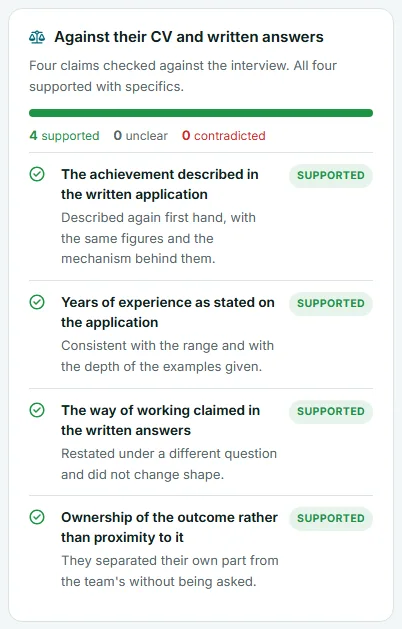
Against their CV and written answers
When the candidate applies, the AI reads their CV and written answers alongside the interview transcript. They are given for comparison only, never as something to score. It picks out claims the application makes, up to eight, and says what the interview showed about each one.
The card shows, from top to bottom:
- a one or two sentence lead, such as "Four claims checked against the interview. All four supported with specifics.",
- a coloured bar split by result, then the counts, such as "4 supported 0 unclear 0 contradicted",
- each claim in bold, what the interview showed underneath, and a tag on the right.
| Tag | Meaning |
|---|---|
| Supported (green) | The interview backed the claim, for example by describing it again first hand with the same figures |
| Unclear (grey) | The interview neither confirmed nor contradicted it |
| Contradicted (red) | What they said in the interview does not match what the application states |
A contradiction is a question, not a verdict
People misremember dates and round numbers. Treat Contradicted as something to raise in the next conversation, and read the transcript before you decide.
Contradicted claims are also passed to the AI that writes the written report, so it weighs them in the overall match. Unclear claims can become follow up questions when you invite the candidate to a technical interview. See Invite to a technical interview.
What the interview got through
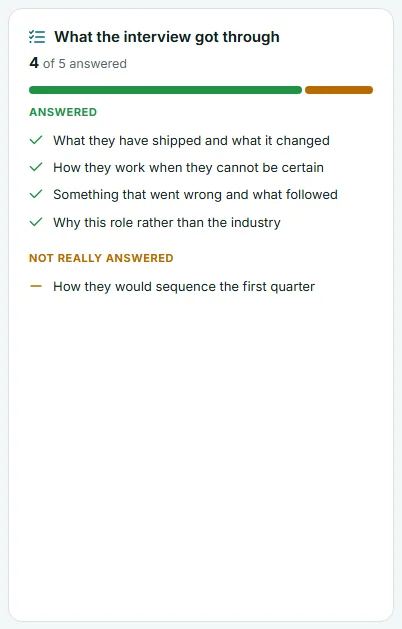
This card lists the questions the AI interviewer asked and sorts them into two groups:
- Answered, with a green tick: the candidate gave a real answer.
- Not really answered, with an amber dash: the question was asked, but the answer did not address it.
The figure at the top, such as "4 of 5 answered", and the green and amber bar show the proportion at a glance.
A question under Not really answered is a gap in what you know, not automatically a weakness. The candidate may have misheard it or gone somewhere else with it. It is a good first question for the next conversation.
CV against this role
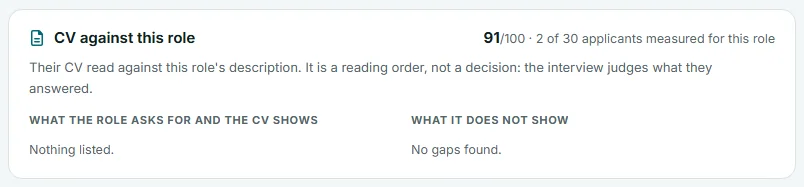
This card is the evidence behind the CV fit tile. The CV alone is read against this role's job description, without the interview or any answers. At the top right you see the score out of 100 and, when other applicants were measured, the rank, such as "2 of 30 applicants measured for this role".
Under the line "Their CV read against this role's description. It is a reading order, not a decision: the interview judges what they answered." are two columns:
| Column | What it lists |
|---|---|
| What the role asks for and the CV shows | Up to eight requirements the CV clearly evidences, each with a green tick. "Nothing listed." when there are none |
| What it does not show | Up to eight things the role asks for that the CV does not show, each with an importance pill: Critical (red), High (amber), Medium or Low. "No gaps found." when there are none |
A gap here means the CV does not show it, not that the person lacks it. Many strong people write thin CVs, which is why the interview carries more weight in the overall match.
The card appears only when a CV was measured. Without a CV, or with one that could not be read, there is no card and no CV fit tile.
How to use the three cards together
- Look for any red Contradicted tag and note it.
- Check Not really answered for questions to ask again.
- Read the Critical and High gaps under What it does not show.
- Turn the most important of these into questions in Notes for your team, then select Save changes.
Frequently asked questions
Why do I not see the claim check card?
It appears only when the interview reading found claims to compare. A candidate with no CV and short written answers may leave nothing to check. With no voice interview reading, neither this card nor What the interview got through appears.
Is the CV fit score part of the overall match?
Not directly. CV fit is a separate reading of the CV alone. The overall match reads the CV too, but as one source among the written answers, the interview and the follow ups, and it treats the CV as the candidate's own claim rather than verified fact.
Can the claim check be wrong?
Yes. It is one reading of one conversation. Every claim shows what the interview said about it, so you can judge for yourself, and the Interview tab has the full transcript.
Does the candidate see these gaps?
Not from your workspace. Job seekers can run their own resume review in the candidate portal, which uses the same three words, Strong, Fair and Weak, for a CV score.