Role details tab
The Role details tab of a Risenoow role holds the facts of the job: what it is, where it is, how it is employed and what it pays. These facts make the public job card and the job board filters, and the job description and questions are written from them.
Where: Job openings, Edit on a role (it opens on this tab)
Who can use it: Admins and recruiters (recruiters on their own roles)
Time needed: One to three minutes
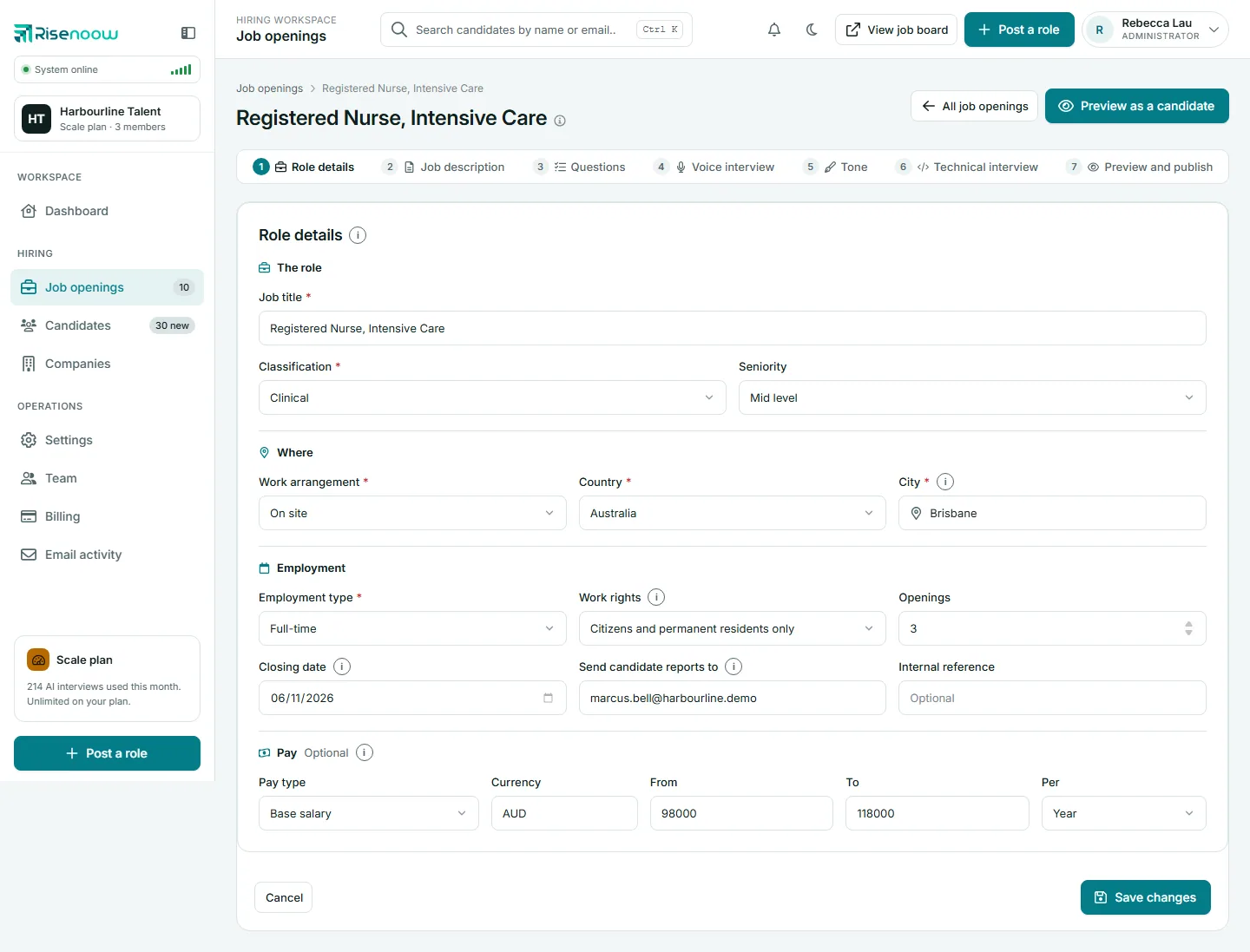
Fields marked with a red star are required.
The role
| Field | What it holds |
|---|---|
| Job title | The role's name, as candidates see it |
| Classification | The field of work, such as Engineering, Healthcare or Sales. A role that already has a classification from an older list keeps it |
| Seniority | Entry level, Associate, Mid level, Senior, Director, Executive or Internship. Optional |
When you change the job title, the role card's title follows it.
Where
| Field | What it holds |
|---|---|
| Work arrangement | On site, Hybrid or Remote |
| Country | Where the role is based |
| City | Start typing and choose a suggestion. Required unless the role is fully remote |
Changing the country clears the city and sets the pay currency to that country's currency.
Employment
| Field | What it holds |
|---|---|
| Employment type | Internship, Contract, Temporary, Casual, Part-time or Full-time |
| Contract length | Appears for Contract and Temporary roles, for example 6 months |
| Work rights | Any valid work rights, Citizens and permanent residents only, Visa sponsorship available, or Student visa holders welcome. Candidates can filter on this, so say if you can sponsor a visa |
| Openings | How many people you are hiring, from 1 to 999 |
| Closing date | After this date the role leaves the public job board and its application link stops taking applications. Leave it empty for no closing date |
| Send candidate reports to | Where scored reports for this role are emailed. Separate several addresses with commas, up to ten |
| Internal reference | Your own code for the role. Optional |
Closing dates in the past
You cannot change the closing date to a day that has already passed. A role whose saved date has already passed can keep it.
Pay
Pay is optional. Pay you enter is shown on the job card and used in the job description. Leave it empty and no pay is shown.
- Pay type: Base salary or Total package.
- Currency: a three letter code, such as AUD.
- From and To: write them as you usually would, such as 90000, 90k, $90,000 or 90 000. A figure that cannot be read is refused with a message, and what you typed stays in the box so you can correct it.
- Per: Year, Month, Week, Day or Hour.
Saving
- Change the fields you need.
- Select Save changes. Cancel returns to Job openings without saving.
- A message confirms Role details saved. If a field needs another look, the page says so and marks it.
If the facts changed and the role already has questions, the page then asks Update the questions to match the new role details? You can tick which sets to write again, or ignore it and keep the questions you have. See Regenerate with AI.
If someone else saved the role while you had it open, nothing is saved and you are asked to reload the page and try again.
Frequently asked questions
Why is the City field required?
A city is needed for on site and hybrid roles so candidates know where the work is. Choose Remote as the work arrangement and the city becomes optional.
Does the closing date stop people applying?
Yes. After its closing date the role leaves the public job board, and anyone who opens the application link sees This role has closed. To stop applications before the date, disable the role. See Close, disable or delete.
Can reports go to more than one person?
Yes. Enter up to ten email addresses in Send candidate reports to, separated by commas.
Do I have to show pay?
No. Leave the pay fields empty and the card shows Salary not shown.