Tone and style
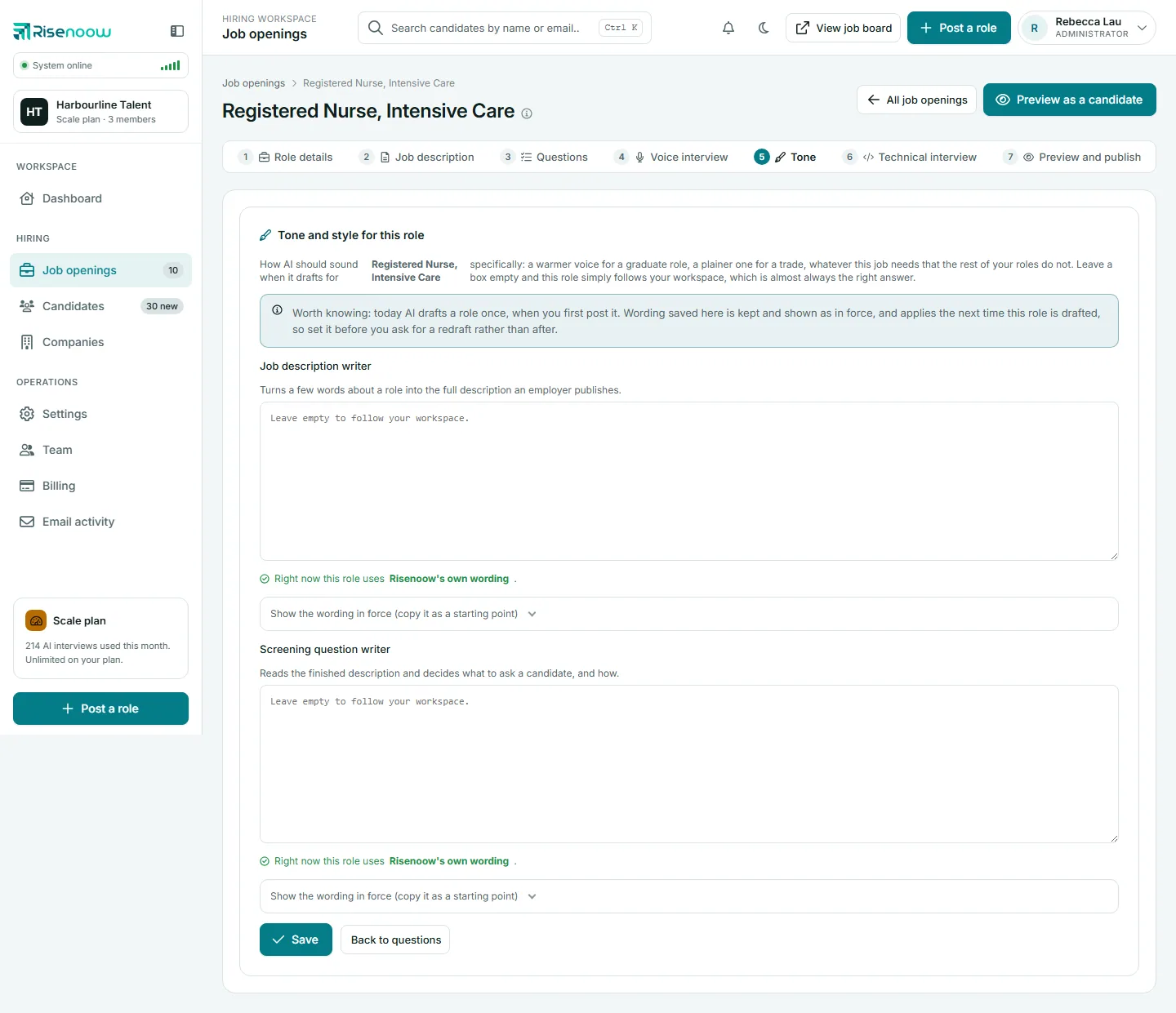
The Tone tab of a Risenoow role sets how the AI should sound when it drafts for that role: a warmer voice for a graduate role, a plainer one for a trade. It is the last of three levels of wording, and any box you leave empty simply follows the level above it.
Where: Job openings, Edit on a role, then the Tone tab
Who can use it: Admins and recruiters (recruiters on their own roles)
Time needed: Five minutes, if you need it at all
The three levels
| Level | Where it is set | When it is used |
|---|---|---|
| Risenoow's own wording | Built in | When the workspace and the role both leave a box empty |
| Your workspace wording | Settings in the left menu, the Tone and style section | For every role in the workspace, unless a role has its own |
| This role's wording | The role's Tone tab | For this role only |
The most specific level that has wording wins. An empty box always means "follow the level above", which for most roles is the right answer.
The two boxes
Each level has the same two boxes:
- Job description writer: turns a few words about a role into the full description an employer publishes.
- Screening question writer: reads the finished description and decides what to ask a candidate, and how.
Under each box, a line says which wording is in force right now: Risenoow's own wording, your workspace wording or this role's wording.
Start from the wording in force
You rarely need to write from nothing.
- Under a box, open Show the wording in force (copy it as a starting point).
- Copy the text shown and paste it into the box.
- Change only what this role needs, for example the tone or the reading level.
- Select Save. A message confirms Saved for this role.
To go back to inheriting, clear the box and select Save.
Keep the placeholders
The wording in force contains placeholders in curly brackets, such as {company_line}, where Risenoow puts in the role's details. If your wording drops one, nothing is saved and a message names what is missing, for example "Nothing was saved. Job description writer is missing {language_line}." Put it back, or leave the box empty to follow your workspace.
When this role's wording is used
The wording applies the next time the AI writes for this role:
- Screening question writer: used when you write this role's questions again from the Questions tab, with Write a fresh set with AI or by updating the questions after a change to the description. Questions already written stay as they are until you write them again.
- Job description writer: used only while a description is still being written in Post a role, for example for a role saved as a draft before its description was kept. Once the role has its description, this wording changes nothing; edit the description on the Job description tab instead.
For each box the AI uses this role's wording first, then your workspace wording, then Risenoow's own.
When to use a role level tone
Most roles should follow the workspace. Use the Tone tab when one role genuinely needs a different voice from the rest, for example:
- A graduate programme that should sound encouraging and plain.
- A senior leadership role that should sound formal and concise.
- A trade or frontline role where shorter sentences read better.
If every role needs the change, set it once in Settings under Tone and style instead.
Frequently asked questions
What happens if I leave both boxes empty?
The role follows your workspace wording. If the workspace boxes are also empty, Risenoow's own wording is used.
Does the tone here change the voice interviewer?
No. These boxes guide the written drafts: the job description and the screening questions. The interviewer's manner is set in the role's AI role and behaviour prompt on the Voice interview tab, and in Settings under Voice interviewer.
Will saving here rewrite my job description?
No. Saving stores the wording for this role. Your current description and questions stay exactly as they are. The screening question wording takes effect the next time you write this role's questions again.
How do I know which wording is being used?
Read the line under each box. It names the level in force: Risenoow's, your workspace's or this role's.