Close, disable or delete a role
Risenoow gives you four ways to wind a role down, from the gentlest to the most final: a closing date, unpublishing, disabling and deleting. Each does something different to the job board, the application link and the applications you already have, so pick the one that matches what you want.
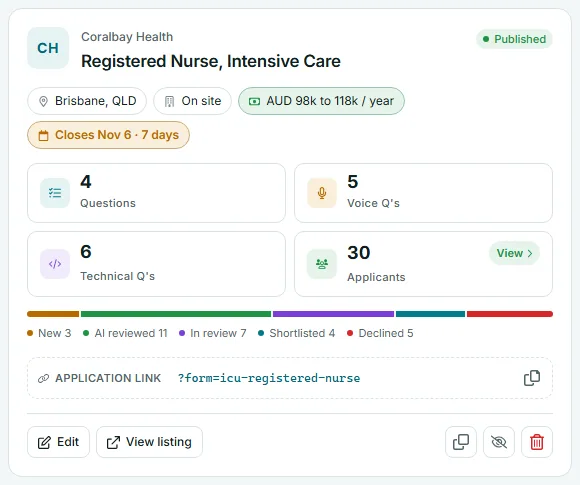
Where: Job openings in the left menu, the icon buttons on a role card
Who can use it: Administrators and recruiters (recruiters on their own roles)
Time needed: Under a minute
Which one to use
| Action | On the job board | Application link | Applications already received |
|---|---|---|---|
| Closing date passes | Removed after the date | Not affected | Kept |
| Unpublish | Removed, back to a draft | Still works | Kept |
| Disable | Removed | Stops taking applications | Kept |
| Delete | Removed | Gone | Kept |
Set a closing date
Set Closing date on the Role details tab. The role leaves the public job board after that day. The card shows the date, turns amber in the last seven days, and reads Closed with the date once it has passed.
Unpublish
Open the role's Preview and publish tab and select Unpublish. The role returns to a draft and leaves the job board and job alerts. People who already have the link can still apply. See Preview and publish.
Disable
- On the role card, select the eye button with a line through it. Its tip reads Disable: stop taking applications.
- The card's badge changes to Disabled and the role moves to the Disabled tab.
A disabled role takes no applications. Anyone part way through an application who then sends it is told This role is no longer accepting applications. Your questions, settings and applicants are all kept.
To switch it back on, select the eye button again (Enable: take applications again). The role returns as it was. If your plan's open role limit is reached, you are asked to close another role or upgrade in Billing first. See pricing.
Delete
- On the role card, select the red bin button.
- The confirmation names the role and says its questions are removed and how many applications are kept.
- Select Delete.
Before you delete
Deleting cannot be undone. The role, its written, voice and technical questions and any question images are removed. The applications it received are kept on your record. If you might hire for the role again, disable it instead.
The public sample interview behind every Try an interview link on the Risenoow site cannot be deleted. It can only be closed.
Duplicate a role
Duplicating is the quickest way to post a similar role.
- On the role card, select the duplicate button and confirm Duplicate.
- A copy appears with (Copy) after its title and its own application link.
- The copy starts switched off, with the Disabled badge. Select the eye button to switch it on; it becomes a draft.
- Edit the copy, then publish it.
The copy brings the role details, pay, job description, company, languages, voice settings, candidate messages, the written questions and the voice questions with their images. It does not bring applicants. Before publishing a copy, check its Questions tab for accepted answers and its Technical interview tab, and set them again where needed.
Frequently asked questions
Will candidates who applied be told the role closed?
Closing, unpublishing or disabling a role does not email anyone. Manage each applicant's stage from the Candidates page.
Can I reopen a disabled role?
Yes. Select the eye button on its card. The role returns with everything it had.
Does deleting a role delete the candidates?
No. Applications are kept on your record. Only the role and its questions are removed.
Why does my copied role say Disabled?
Copies start switched off so they do not use one of your plan's open roles until you are ready. Switch it on, then publish.