Careers page
Your workspace can have its own careers page at risenoow.com/careers/your-name. It carries your name, logo and colour, lists only your roles, and each role has its own page with one Apply now button. Job sites such as Indeed, LinkedIn and Seek accept an employer's careers page as the place candidates apply, so a role's page is the link to give them.
Where: Settings, then Careers page in the section menu
Who can use it: Workspace admins only
Time needed: 3 minutes
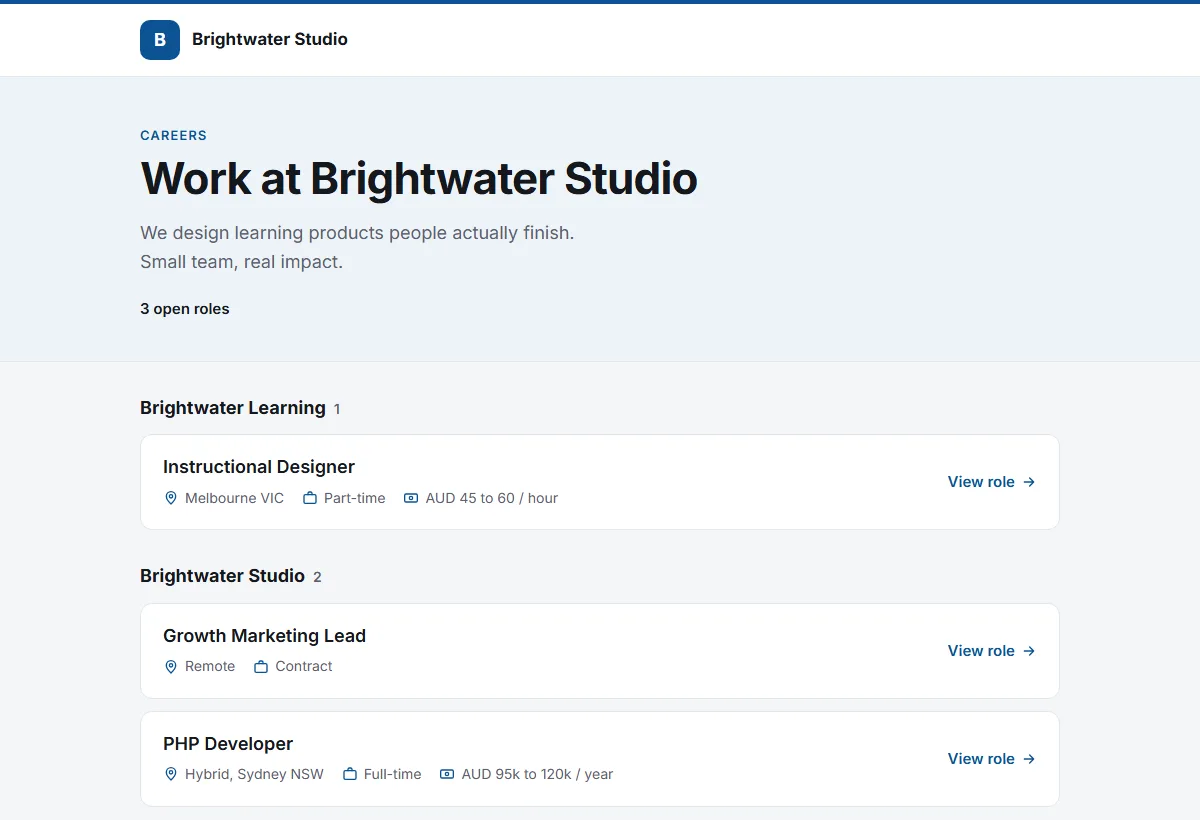
What candidates see
| Page | Address | What is on it | |
|---|---|---|---|
| Your careers page | risenoow.com/careers/your-address | Your logo and name, your introduction, and your open roles grouped by hiring company | |
| A role's page | risenoow.com/careers/your-address/role | The title, company, location, employment type, pay if you show it, the closing date, the job description and Apply now |
Apply now opens the same application and interview candidates get from the Risenoow job board, with the same consent steps. The pages carry no Risenoow menu, only a small Powered by Risenoow line at the bottom.
Turn the page on
- Open Settings and choose Careers page in the section menu.
- Check Page address. It starts as your workspace name; change it if you like.
- Pick a Logo and a Brand colour, and write a short Introduction.
- Tick Show my careers page.
- Select Save settings.
After the first save, Preview opens your page and Copy link copies its address.
| Field | What it does | |
|---|---|---|
| Show my careers page | When it is off, the page and every role page on it show "This page is not available" to the public. Your team can still preview it while signed in. | |
| Page address | 2 to 64 lower case letters, numbers and hyphens. It must be unique on Risenoow. Changing it breaks links you have already posted. | |
| Logo | Chosen from the logos of your companies. Add or change a logo under Companies. With no logo, the page shows the first letter of your workspace name. | |
| Brand colour | Used for buttons and the top of the page. A pale colour is darkened for text so it stays readable. | |
| Introduction | Up to 300 characters, shown under the page heading. | |
| Roles shown | Every listed role, or Only the roles I pick. |
Which roles appear
A role appears on your careers page when all of these are true:
- it is open (not switched off),
- it is listed on the job board,
- its closing date has not passed,
- and, with Only the roles I pick, you ticked it.
Any other role's page shows "This page is not available".
Post a role on a job site
- Open your careers page with Preview.
- Open the role and copy its address from the browser.
- Paste that address as the apply link, or external application address, on the job site.
Good to know
Your careers page and its roles are listed for search engines, with the role details job search tools read, so your roles can also be found through search.
Frequently asked questions
Can a demo workspace have a careers page?
No. Demo workspaces never get a public careers page.
What happens when my trial ends?
While your workspace has no active plan, your careers page and its roles show "This page is not available". They come back when the plan is active again.
Does the Risenoow job board change?
No. Your listed roles stay on the Risenoow job board as before. The careers page is an extra address for the same roles.